# Welcome

Tournament Directors know that the venue in which a tournament is hosted plays a critical role in the success of that event. The ability to communicate quickly with all attendees, the ability to find people when you need them, whether you can verify that everyone is where they’re supposed to be and how easy (or difficult!) competition rooms are to use can make or break a tournament.
Online tournaments face these challenges amplified by the lack of familiarity with the online approach to tournament hosting. Trying to bootstrap a solution like Zoom, Microsoft Teams or Webex can be prohibitively expensive and, more importantly, fails to provide a Tournament Director with the tools they need to manage a successful event. How do you coordinate between a tabulation program, a communication platform for all participants, a central clearinghouse for tournament announcements and support for technical issues all while hoping your videoconferencing service remains stable? No one program, website or platform has all the tools a Tournament Director needs to manage a successful tournament.
Until now.

Yaatly is your virtual speech & debate tournament building, complete with an Auditorium for holding general assemblies, a Lobby in which postings uploaded from your tab program lead competitors directly to their Competition Rooms, private Team Rooms in which squads can strategize and prep, easy access for observers, private deliberation rooms in which judges can meet and much more. A suite of tools allows a Tournament Director to customize and manage the event as they prefer. Most importantly, all your participants gather on Yaatly in the same way they’d gather in a building for an in-person tournament.


Yaatly has . . .
* Familiarity: designed to mimic the in-person tournament experience.
* Stability: built on a proven, 3rd party videoconferencing platform.
* Flexibility: can accommodate IEs and all debate formats.
* Scalability: can handle large events--our top end is near 100,000 participants!
* Reliability: dozens tournaments around the world have successfully run on Yaatly.
Please check out our User Guides to better understand how Yaatly can work for you!
# What's New
Check here for recent updates to the Yaatly platform!
## Room groups in the Lobby
You can now set up rooms and room groups unique to your tournament in the Lobby side bar. We've created two standing room groups--Tournament HQ & Social Hall--that are standard, but you can add any room group you'd like.

You an always control the availability and access to your room groups. In the Manage Event panel, you'll find the ability to opt not to display the Event HQ and Social Hall rooms, or to limit the ability of your participants to create rooms in the Social Hall room group.

### Tournament HQ
The Tournament HQ allows you to use "utility rooms" as points of contact for your event's participants. Tournaments hosted on Yaatly often set up and "Info Desk" and "Judges' Lounge" for their event, but tournament organizers can create their own versions of Tournament HQ rooms.

### Social Hall
The Social Hall room group gives your participants the ability to create video conference rooms open to all participants. These user-defined rooms are great for socializing between rounds, hosting event-specific discussions or anything else your participants would like. Remember that you can turn off permission for participants to create their own rooms in the Manage Event panel (see above).

## Limited Preparation Events Waiting Rooms
Many limited prep events use the same prompts for all competitors in a section. In a face-to-face tournament, this is easy enough to manage by having competitors wait in the hall until it's their turn to speak. In an online environment, this can be more challenging. Until now.
With our new Waiting Room mode, you can be sure that you competitors don't hear their prompt until it's their turn. Judges in limited prep events can activate Waiting Room mode in any Individual Events (Speech) Competition Room:

Once enabled, the judge will see the Waiting Room icon at the bottom of their screen. A red badge tells you how many competitors are currently waiting and selecting the icon provides you with a list of the competitors currently in the waiting room:

The judge may admit competitors one-by-one by selecting "approve" next to the competitor's name.
If any competitors have arrived before the judge, they should be asked to leave while the judge activates the Waiting Room. Once it's active, competitors will enter their room via the posting as usual and confirm their role in the room, but instead of entering the competition room, they'll receive notice that they're in the Waiting Room:

Competitors may adjust their status to communicate to the judge that they're double- or triple-entered or that they're ready to compete:

## Extemp Draw room
We're excited to introduce our extemp draw room. Built according to our guiding principle--to make your experience on Yaatly as much like a face-to-face tournament as possible--we hope you'll feel at home when you're preparing for your extemporaneous speaking events.
Draw rooms are run by a draw room manager who oversees release of topics to competitors using the tools built into the room. Anyone with administrative priviledges at an event can serve as a draw room manager. Tournament administrators activate the draw room in the Event Management panel found in the lobby of their event.

Enabling the draw room makes it visible to all participants in the lobby, right next to the Auditorium and their Team Room.

Draw room managers set up the room when they enter for the first time. **You must have postings for the round containing your extemp event uploaded before you can set up the draw room**. When the draw room manager first enters the draw room, they'll select which events will make use of the draw room. More than one event may be selected (if you're running Varsity/JV divisions or separate extemp events like US and International Extemp).

Selecting the events that will use the draw room automatically imports those postings into the room so they're visible in the draw room. If multiple events are selected, each event will have its own draw room accessible from the tabs at the top of the screen.
From within the draw room, the draw room manager will be able to set up draw times for each event by inputting the start of the draw time, the length of prep, the interval between speakers' drawing and the maximum number of speakers in any section. Draw and speak times for each speaker will be auto-generated and displayed for everyone in the draw room.

When it's time for the next speakers to draw, the manager may post questions in the lower left corner by copy/pasting from a prepared document or creating questions on-the-fly.

Draw room managers also have other tools available to them, like the option to add another event, the ability to turn their camera and mic on and off, the ability add another event and a live list of contestants in the room. Only managers have video capability in the draw room; competitors have audio capability only.

When it's time for the next draw, the manager may simply close the tab(s) for the event(s) that are complete. When all tabs are closed, the manager will be prompted to select from the next batch of postings to set up the next round's draw room.
**Remember that you must have uploaded the postings for your extemp events before you can set up your draw room.** This is true for initial set up and for each subsequent round for which you set up the draw room

## **Breakout rooms from within Team Rooms**
Team rooms are a very popular feature on Yaatly. The ability to gather with other members of your squad to debrief rounds or plan strategy--or just to socialize--is a critical part of successful competition. Now we've added a new feature that makes our Team Rooms even more useful.
You can now create breakout rooms from within your team room. You can use breakout rooms to to have conversations apart from the chaos of trying to get a word in edgewise in a crowded team room.
To create or access breakout rooms, select the "Rooms" tab in the right sidebar. You'll see options to create a room, join an existing room or delete rooms. You can even give your breakout room a name that tells others what's happening in there!

## Connectivity help
Given the wide range of internet connections, devices and geographic locations from which people connect to Yaatly, we can't always control for the stability of their connectivity. At time, users' connectivity may affect the quality of other users' experience because of the demands it puts on your internet connection or your device's CPU. We've built in tools to help you manage connectivity issues.
### Pause video
You can control whether your screen displays the other participants' videos to lower the demand on your internet connection or CPU. In the lower right-hand corner of competition rooms, you'll find an option to pause video tiles. When you select this option, your screen will no longer display other participants' videos. **You'll still be able to hear their audio and other users on other devices will not be affected**. You can also pause a single participant's video tile on your screen by clicking the pause icon on that user's video tile. Other users will still see that participant's video and hear their audio.

### Backup Rooms
If you room becomes unstable, you can elect to join a backup room from within your competition room. In the lower right-hand corner, you can select "join backup room" to be taken directly into a standard videoconferencing room. Note that all members of the room must choose this option; typically a judge will ask competitors to move to the backup room.

## **New IE/Speech Platform**
We’re very excited to roll out our new platform for synchronous Speech/Individual Events tournaments. You can also watch [a recording of a recent demo](https://youtu.be/PDtFtF5EMVk) that walks through many of these features. You can now upload postings from SpeechWire or Forensicstournament.net directly into Yaatly. Postings--and links to the competition rooms--appear in the lobby, neatly organized by tab for each competitive event.
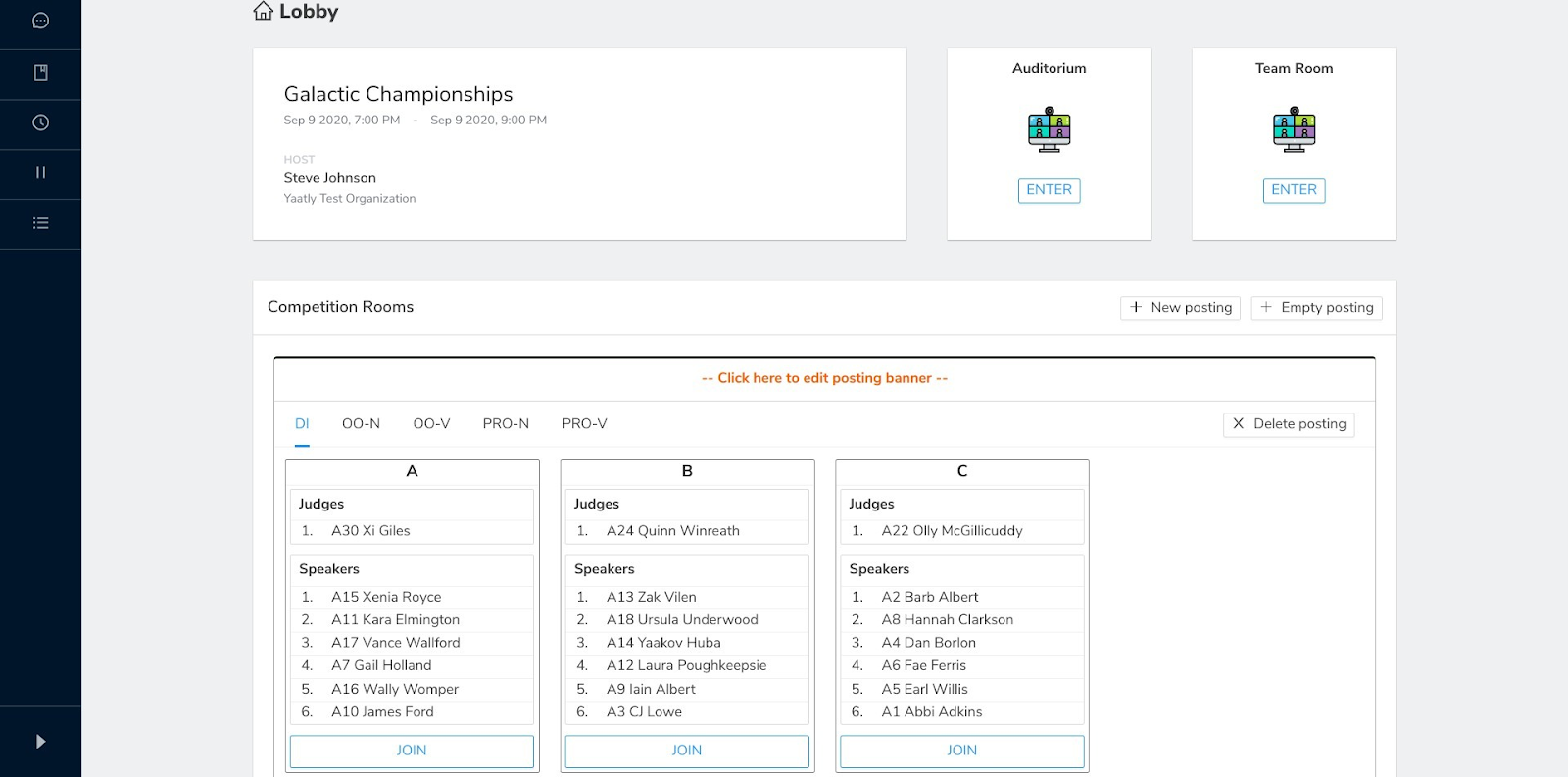
Our IE/Speech competition rooms are built on the same functionality as our debate rooms but have features devoted to the needs of IE/Speech competitors, like direct import of speaker lists from postings, Double/Triple-entered indicators for competitors, in-room timers and the ability to split the screen for Duo events.
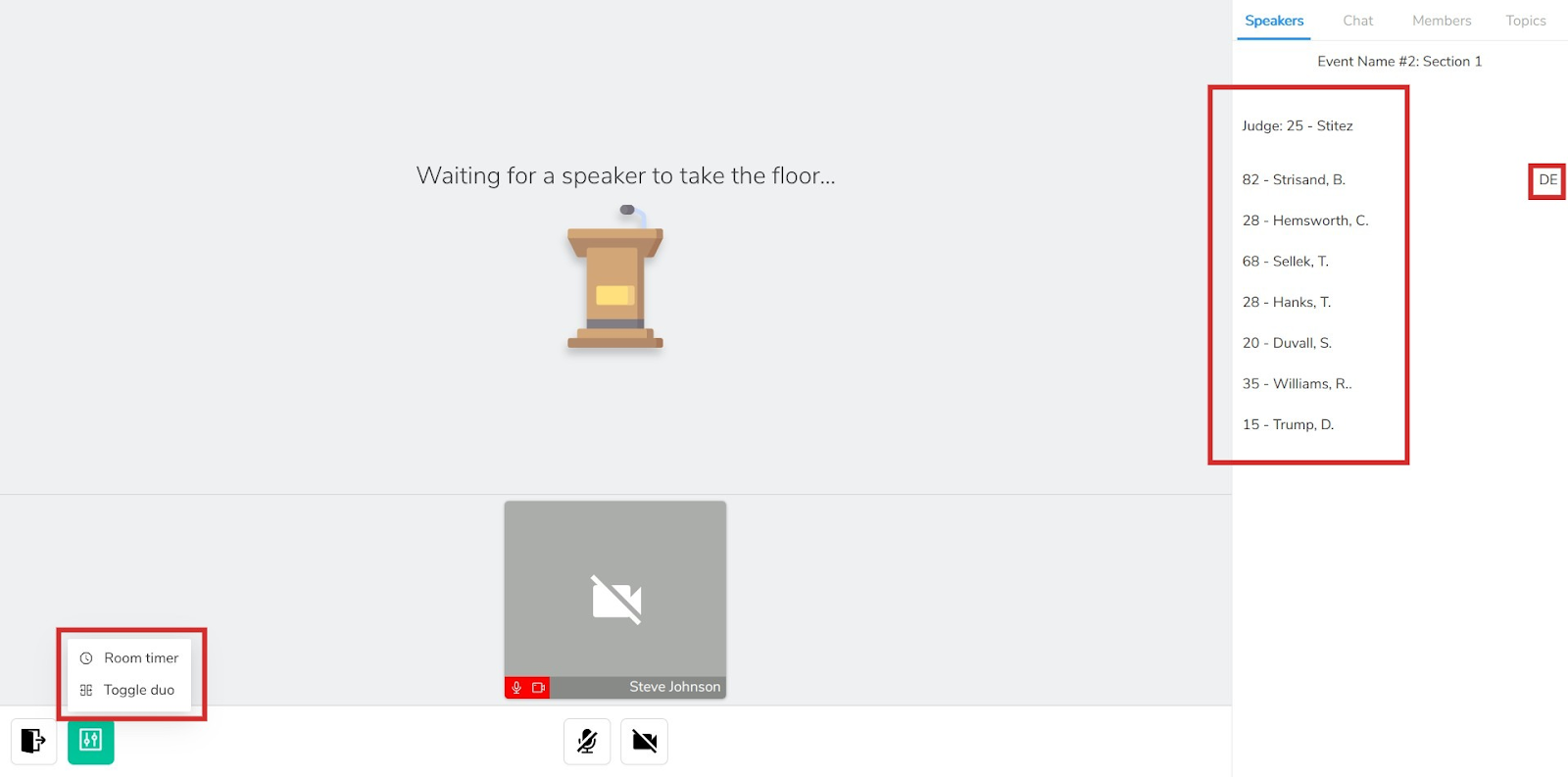
You can read more about [creating IE/Speech postings](https://info.yaatly.com/user-guides/guide-for-tournament-directors#ie-speech-postings-and-competition-rooms) or the [features in our IE/Speech competition rooms](https://info.yaatly.com/user-guides/guide-for-participants-competitors-judges-observers#what-do-i-do-now-that-im-in-my-competition-room) in our documentation.
## **New Auditorium options**
We’ve reconfigured our Auditorium to make it more functional. By default, the Auditorium now uses a Jitsi meeting room that has all the features you’ve come to expect--screen sharing, chat, participant controls and more!
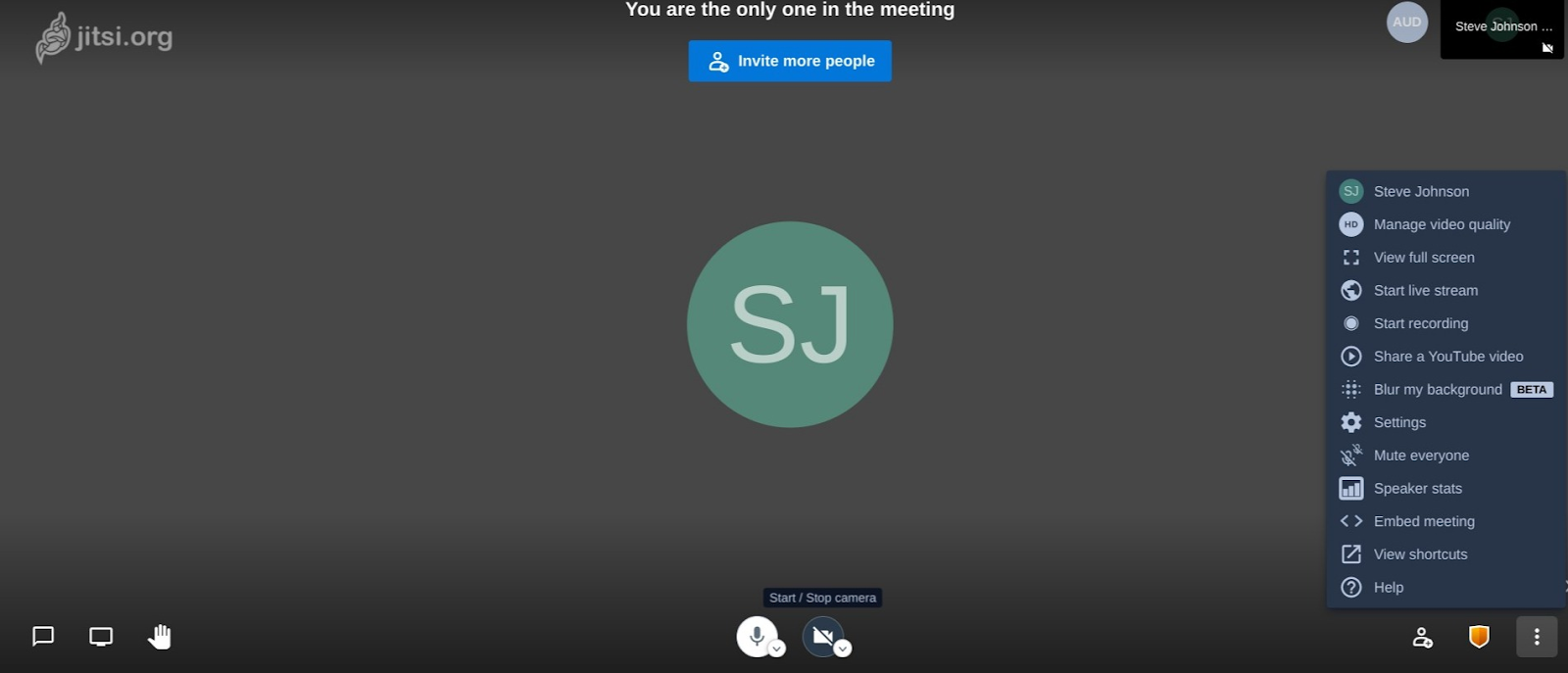
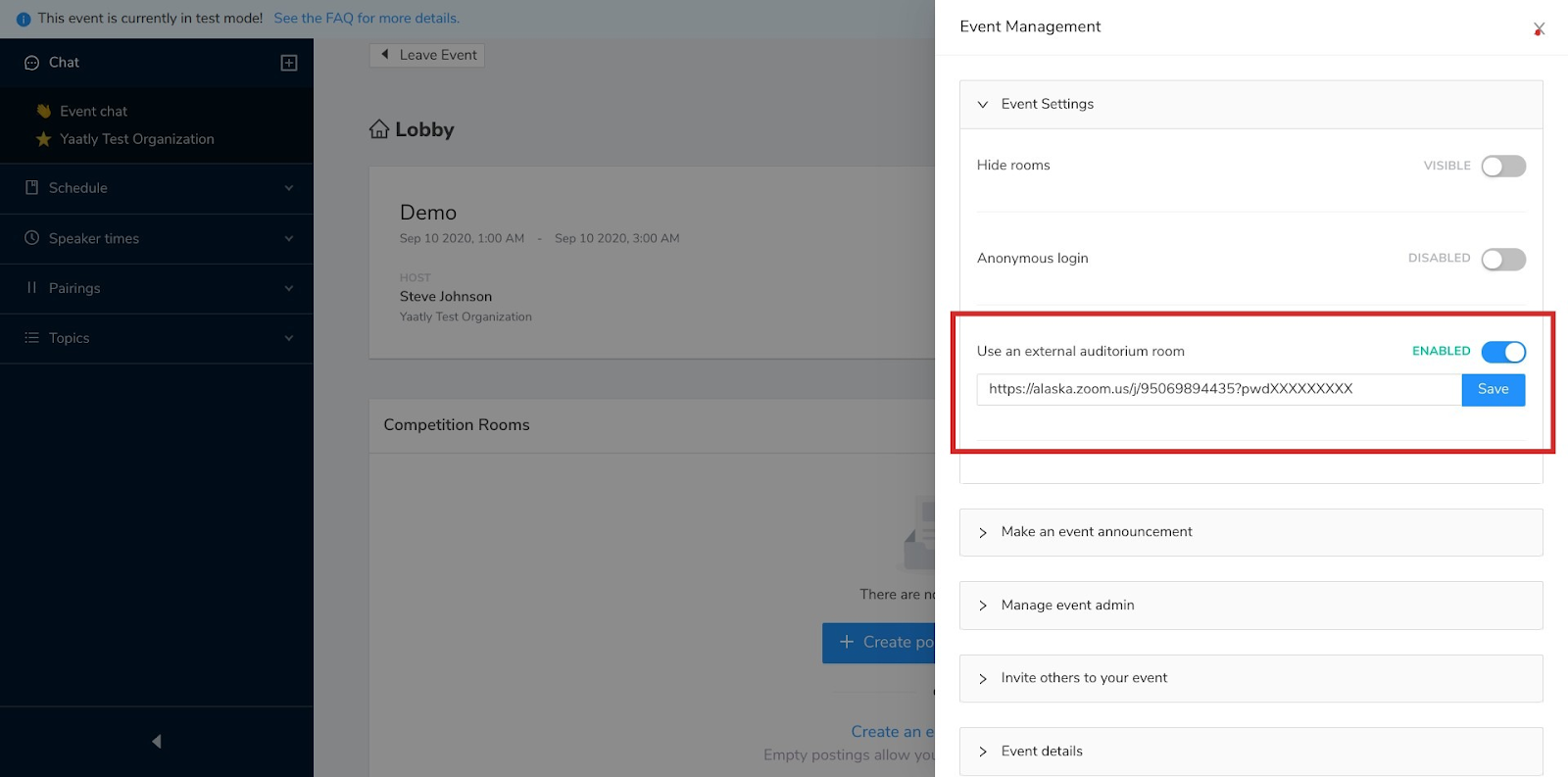
Jitsi rooms are limited to 75 participants. Need more space? Prefer your own video conferencing service? You can now make the Auditorium button in the lobby link directly to a room in Zoom, Webex, Google Meet or any other service. Go to Event Management → Event Settings and drop in the link to your room:
By the way--Team Rooms, Congress and on Yaatly will also use Jitsi rooms. For Team Rooms, you are not able to substitute your own VC provider.
## **Excel file upload for Debates (can include binary and 4-team debates)**
We’ve switched from CSV to XLSX (Excel) file format for uploading debate postings. Why?
XLSX allows you to upload multiple sheets from your spreadsheet program in one file. Running multiple formats of debate in the same time block? How about multiple divisions (Varsity, JV, Novice, etc.) of the same format? Yaatly can handle that!
Just create a separate sheet for each of your formats or divisions within the same XLSX file. Yaatly uses the name of each sheet to create a separate tab for each format or division on the posting.
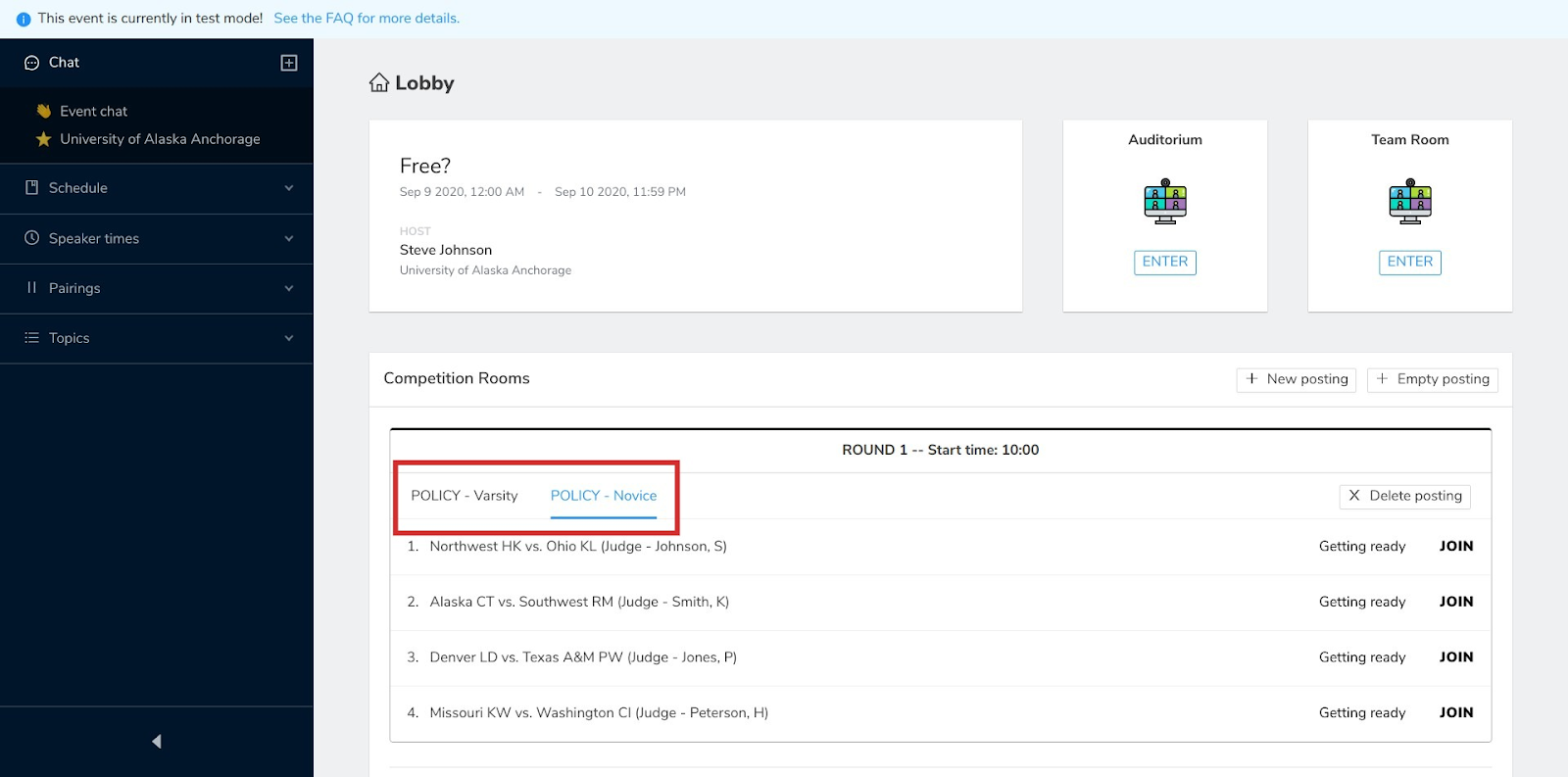
Using SpeechWire or Forensicstournament.net to tab your tournament? Both programs already export your postings for debate or IEs in the XLSX format. You’re ready to run your event!
You can read more about managing postings with XLSX file uploads in [here](https://info.yaatly.com/user-guides/guide-for-tournament-directors#how-do-i-create-competition-rooms).
## Capacity/Time extensions
You’ll automatically get a notification when your event is nearing the time you set for the day to conclude or you’re within 10 people of the capacity you set. Tournament running late? More people attended than you expected? No problem!
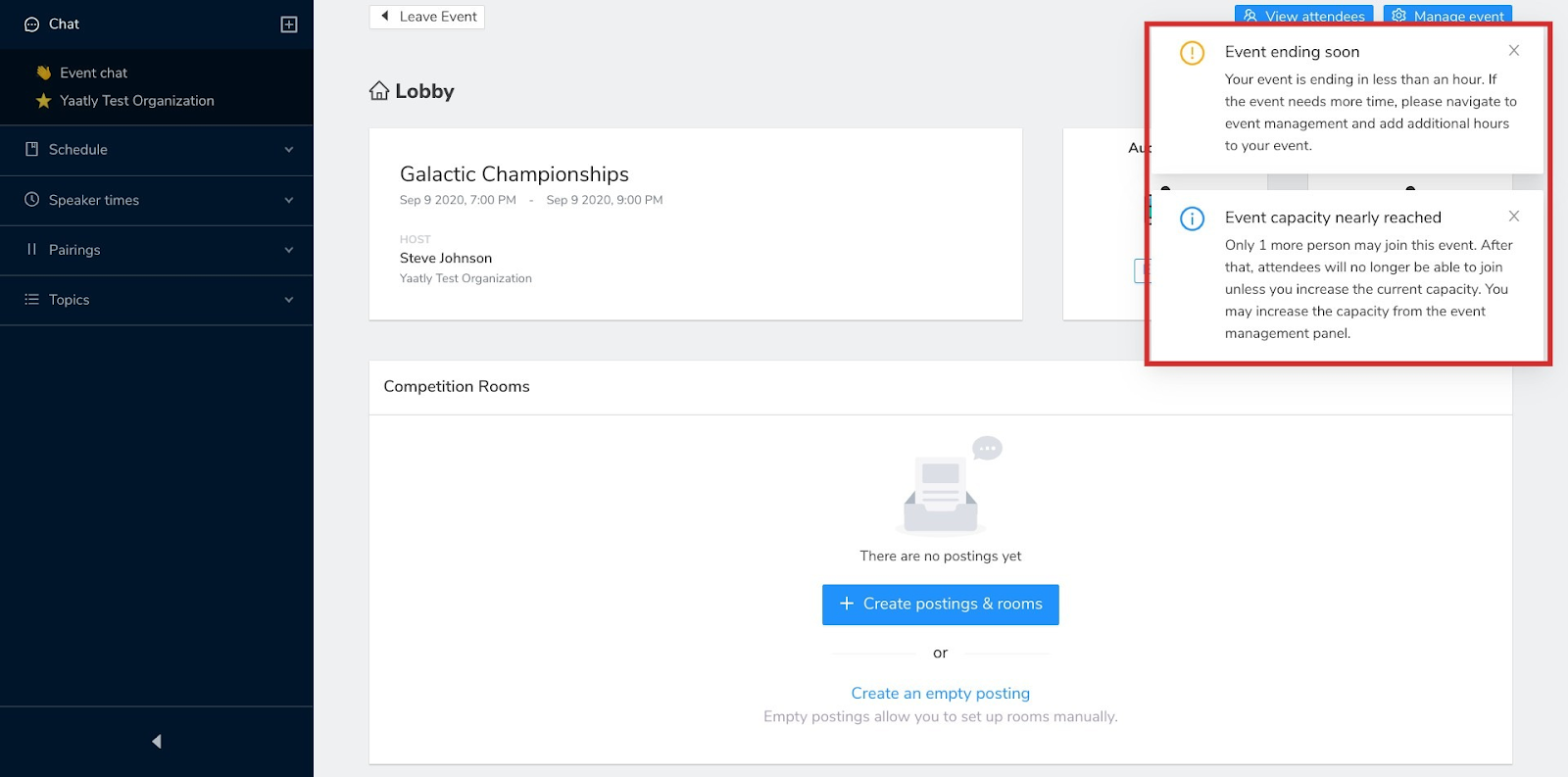
Now you can increase your event’s time or capacity on the fly! Check the Event Management panel for the Event Details option, then choose to edit your event information. Yaatly automatically calculates the credits needed to extend time or capacity.
## **Change/Delete event dates before they start**
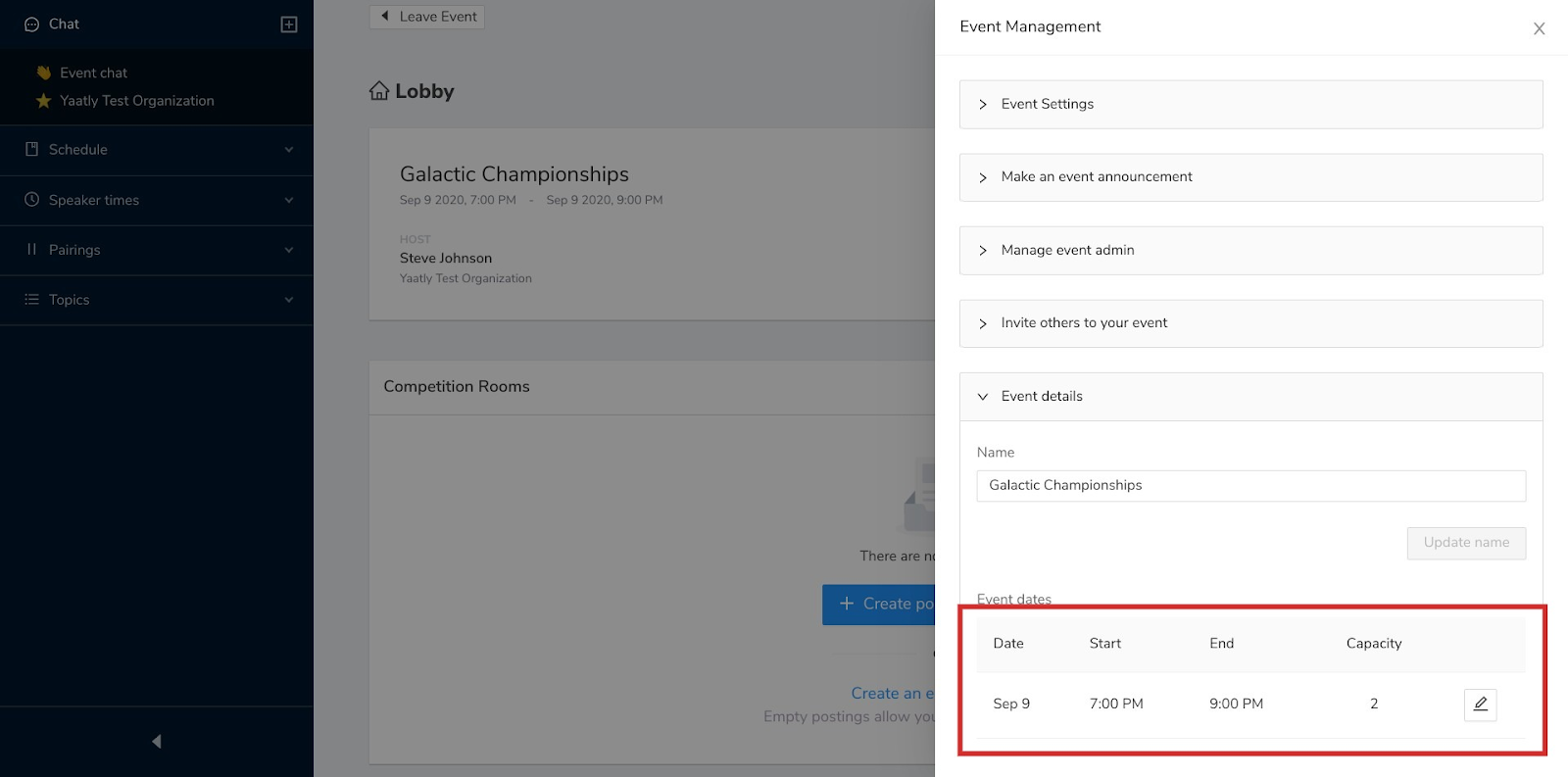
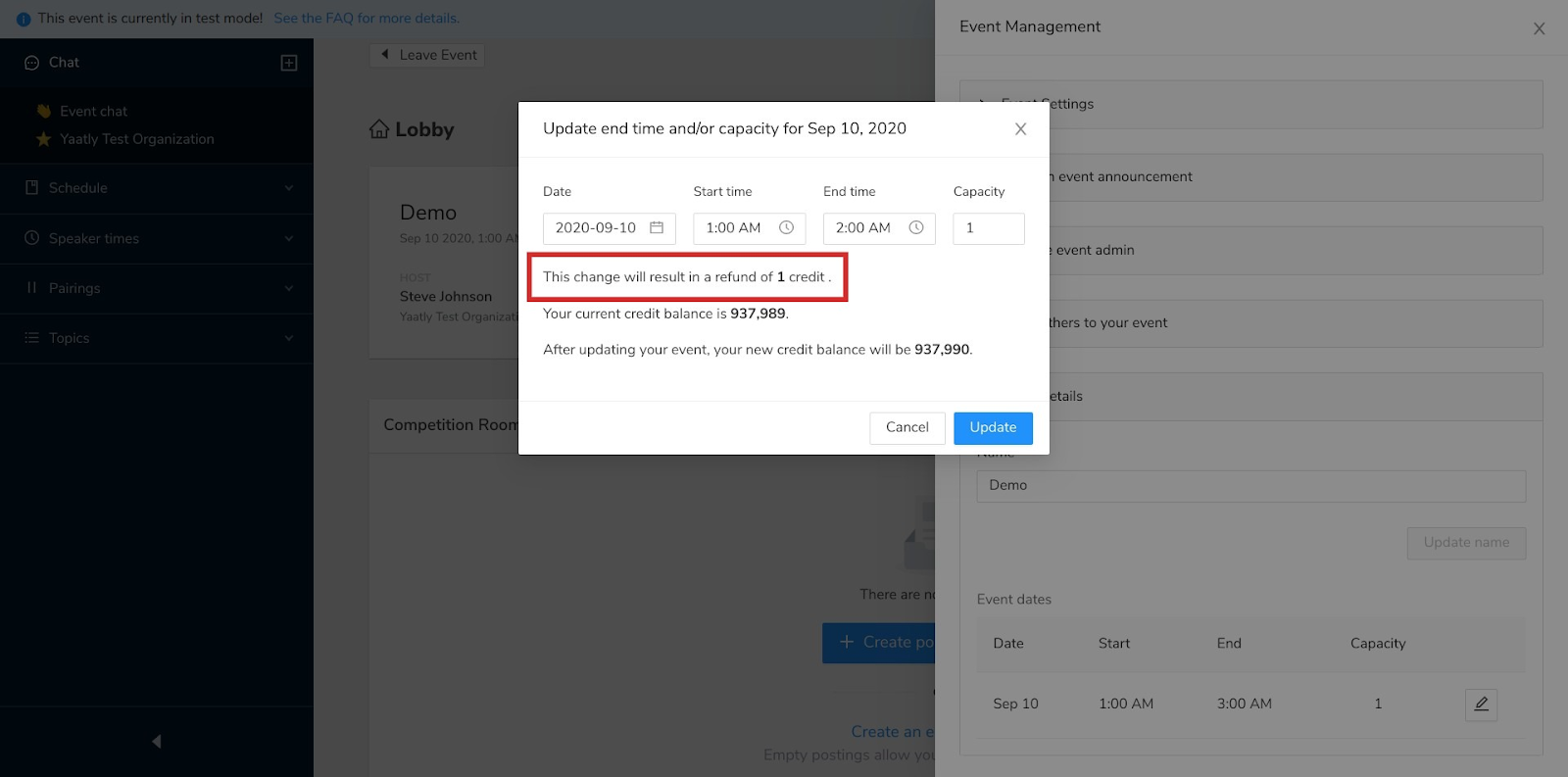
Need to adjust the dates, times or capacity of your event before it begins? Enter your event (it’s in demo mode before it goes live, but you can still make adjustments) and go to Event Management → Event Details to make the adjustment.
When you change your event’s parameters, Yaatly automatically refunds credits no longer needed or tells you how many additional credits will be required.
## **Automatically mute non-speakers in IE rooms**
Participants in IE/Speech Competition rooms are automatically muted when a competitor takes the floor. This prevents accidental interruptions of the performer and relieves the judge of having to remind people to mute their microphones.
# Quick Start Guide
Check this short guide for getting your tournament up-and-running!
## Videos
If you prefer, you're welcome to check out the Quickstart Playlist to review the following videos:
* [Setting up your Organization on Yaatly](https://youtu.be/zYSW47LDxZM)
* [Creating & paying for events on Yaatly](https://youtu.be/7TqxkgKiIrw)
* [Yaatly's tournament management tools](https://youtu.be/KDLA22TcjGc)
* [Creating debate rooms & postings](https://youtu.be/AkkBSnU_4GA)
* [Creating IE/Speech rooms & postings](https://youtu.be/mZ6THOYsR8U)
* [Navigating debate competition rooms](https://youtu.be/rbZFlCOP5X4)
* [Navigating IE/Speech competition rooms](https://youtu.be/xtSjFb8MWrg)
## Step-by-Step
If you've never used Yaatly before (or never hosted an online tournament before), follow these steps to get started:
1. [**Set up your Organization**](/user-guides/guide-for-organization-managers#whats-an-organization-and-who-manages-it)**.** All events are hosted by Organizations. Usually, your organization is the speech and debate program that you manage. The person in charge of your speech and debate program is usually the person who sets up your organization.
2. [**Invite others to join your Organization.**](/user-guides/guide-for-organization-managers#how-do-i-add-my-organizations-members-to-yaatly) All those affiliated with your program (students, club members, debaters, etc.) will need to affiliate with your Organization to participate in events on Yaatly. When other organizations invite your Organization to events, your Organization's members can attend.
3. [**Create an Event**](/user-guides/guide-for-organization-managers#what-is-an-event)**.** Events are tournaments, practice sessions, workshops, etc. hosted on Yaatly. For events, an Organization specifies the start and end date and time. You'll receive information about the cost of using Yaatly when you set up your event.
4. [**Invite other Organizations to your Event**](/user-guides/guide-for-tournament-directors#how-do-i-invite-people-to-my-tournament). Once your event is set up, you can invite other Organizations to join by sharing the Event URL. Typically, these are Organizations that plan to compete in your tournament. When you invite an Organization to your event, all members of that Organization can attend by RSVPing through their home page.
5. [**Manage your tournament**.](/user-guides/guide-for-tournament-directors) From the lobby of your event, you'll be able to display a posting for upcoming rounds, create competition rooms, make announcements, communicate with individuals at your tournament and do all the things you need to do to make a tournament happen.
6. [**Participate in a tournament**](/user-guides/guide-for-participants-competitors-judges-observers)**.** Participating in a tournament on Yaatly is much like participating in a face-to-face tournament. You can attend briefings in the auditorium, meet up with other members of your Organization in your team room and participate in debates in competition rooms.
Each of the titles in the Quick Start guide links to more extended directions in our User Guides. Feel free to explore to find out even more about using Yaatly!
# Guide for Organization Managers (Coaches, Team Managers, Club Presidents)
Look here for information about creating and managing your organization on Yaatly.
## What's an "Organization" and who manages it?
In Yaatly, an Organization is a speech & debate team, club or society. Teams, clubs or societies need to create an Organization account on Yaatly to participate in online tournaments hosted on Yaatly.
Each Organization relies on an Organization Manager--usually a coach, club president or team leader--to establish and manage the Organization's account on Yaatly. Once this Organization is created, the Organization Manager can invite others to join Yaatly as Participants.
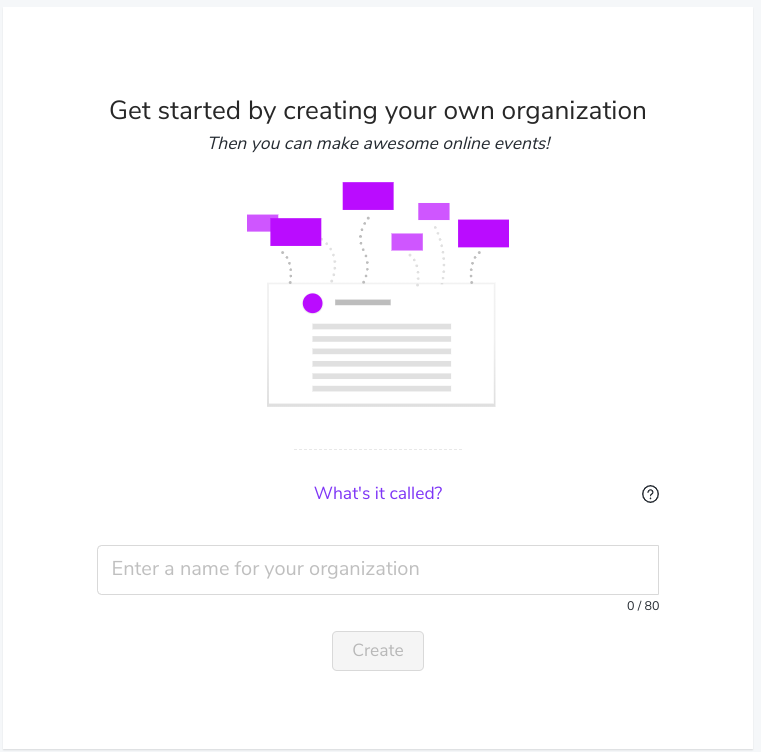
## I'm the coach, club president or team leader. How do I create an Organization on Yaatly?
Sign up for a Yaatly account by visiting yaatly.com. There you'll be asked to complete a simple registration form:

Choose a name for your Yaatly Organization (typically this is your institution's name; i.e.: "Washington High Debate" or "University of the West Literary Society")
## How do I add my Organization's members to Yaatly?
Once you've created your Organization, you’ll be able to invite your Organization’s members and others to join Yaatly and affiliate with your Organization. Do this by choosing your organization from the far left menu, then selecting “Members.” There you’ll see the “Invite Members” button in the upper right hand corner.

Entering members' email addresses will send them an invitation to join Yaatly and affiliate with your Organization. NOTE: we strongly recommend that competitors (students, debaters, speakers, etc.) join Yaatly through the email invitation rather than visiting yaatly.com directly. Doing so avoids accidentally creating redundant organizations.

You also can view and manage the status of your Organization's members from the "Members" tab.

## How to I change settings for my Organization?
You can manage your Organization's settings by selecting your Organization's account on the far left menu, then choosing "Settings" for your Organization.

From this menu, you can upload a logo or image for your Organization, change your Organization's name or delete your organization.
## What is an Event?
Events typically are tournaments that you either host or attend. If you're hosting a tournament, you'll need to create an event. Check out the [Guide for Tournament Directors](https://app.gitbook.com/@yaatly/s/public/~/drafts/-M44nO2IPULluuLraoat/user-guides/guide-for-tournament-directors) for more details.
Usually your Organization will be invited to attend a tournament that someone else is hosting. If that's the case, you'll receive in invitation URL from the Tournament Director.
## How do my Organization's members attend an event?
When you receive the Event Invitation Link from the event host (Tournament Director) you'll have the chance to invite all those affiliated with your Organization to the Event. Select your organization and press the "Invite" button.

This will activate the Event so that it appears on your members' homepages. Your members can visit their homepage to RSVP for the event:

Once they've RSVPd, they'll be able to enter the Event to participate in the tournament.

# Guide for Participants (Competitors, Judges, Observers)
## How do I create an account on Yaatly and affiliate with my Organization?
Your Organization Manager (typically a coach, president or club leader) will email you an invitation to join Yaatly and affiliate with your Organization. Click the link in the invitation and follow the instructions to join your organization.

## How do I participate in an event?
Your Organization Manager will receive an invitation to an event from the Tournament Director. When they accept this invitation, they'll be able to invite your Organization's members to RSVP. You'll see the RSVP option on your personal homepage:

Once you RSVP, you'll be able to enter the Event to participate in the tournament.

## What if I want to attend an event but I'm not affiliated with an Organization on Yaatly?
Sometimes you may want to attend an Event without inviting your whole Organization. Hired judges, observers, alumni, recruiters and others often attend events without the team. To do so, they'll need the invitation URL invitation for the Event from the Tournament Director.
With the invitation URL, any individual can join the event as an unaffiliated individual by selecting "Join as an Individual" on the invitation landing page.

## What do I do once I've entered an event?
Once you're in the Event Lobby, you will probably head to the Auditorium for a general assembly for all tournament participants or to your team's Lounge--a private room only for members of your Organization. You can also find the Tournament HQ in the sidebar as well as the ability to create social rooms that are available to all attendees.

To know where you'll go to compete, you'll need to wait until the Tournament Director makes the posting available. Typically, this happens 15-20 minutes before the round begins.
## How do I know where to go to compete?
When it's time for your round to begin, the posting/pairing will be available in the Lobby. You'll be able to find your team name or your individual name in the posting (or search for it in the page using "ctrl-F"). Once you've found it, you can select "Enter Room"


Next, you'll need to select your role in the room:


If you're competing in IEs, you'll choose your role based on where you're listed as a speaker in the round.

You can adjust your status in the Speech rooms to let your judge know if you're Ready, Double-entered (DE) or Triple-entered (TE)
.jpg?alt=media\&token=d3936f11-7083-4b34-9783-405069401a4f)
## What do I do now that I'm in my competition room?
Debate rooms have a number of tools available to the participants, including camera and microphone on/off buttons, a sidebar with room chat, members list and topics available, an in-room timer controlled by the judge, private preparation rooms for competitors and deliberation rooms for the adjudicators.

Competitors in IE rooms can adjust their status (to indicate if they're triple- or double-entered or ready to compete), they may use their microphone to talk with the judge before they take the floor and, when they're ready, they may take the floor to compete.
When it's your turn to speak, take the floor!

Or join in the debate!

Judges in IE rooms have many of the same tools available to competitors, but also have the ability to set the room timer and to split the screen for duo events involving two competitors.

## What are best practices when preparing to compete online?
1. Check in with each speaker to make sure that the video and microphone are working well.
2. Mute yourself when not speaking.
3. Minimize cross talk. Talking over others muddies audio and makes you and other hard to hear.
4. Plan to handle disconnections. Although rare, connection problems do happen. Consider exchanging cell number or other means by which to connect in the round chat room.
5. If you have trouble connecting, try turning off your video. When connection issues happen, turning off the video may help.
6. Make a note of contact info for the Tournament Director and your Organization Leader in case you have an issue connecting to Yaatly.
You can get more tips on competing online in our [Guide to Competing Online](/user-guides/guide-to-competing-online).
# Guide for Tournament Directors
## I'm ready to set up Yaatly for my tournament. What do I do first?
The first thing you'll need to do is to create an event from your Organization's home page.

You'll need to choose to create either a Demo event or a Live event. The Demo event has all the same functionality but limits video time to only 10 minutes. Demo events are great for exploring Yaatly, familarizing your tournament staff with managing your event or getting your participants familiar with using Yaatly.

When you're ready to create your Live event, you'll next be asked to tell us the date, hours and expected capacity for your event:

Note that you can repeat this step for as many days as your event runs by selecting "Add another day to your event." This is particularly useful if you have a schedule that differs day-to-day or if you're expecting a different number of people each day (or both!).
The information you provide in this step helps us determine what it will cost to run your event on Yaatly. You pay for Yaatly just like you'd pay for renting a building for your face-to-face tournament: once you tell us how long you'll need access and how many you expect, we'll tell you the number of user-hour credits will be required to run your event. [You can read more about our pricing here.](/pricing)

Once you're satisfied with your event set up, you'll be given the option to pay for your event. If you have sufficient credits in your account, you can merely click "Pay XXX Credits"

If you need to purchase more credits, you may do so under your Account, accessible from your Organization home page:

## How do I manage my tournament?
After you've created your event, you'll be able to enter your Event's Lobby. As Tournament Director, you have a number of tools available to you from the lobby. You can find many of these tools by clicking the "Manage Event" button:

That button opens a menu with lots of options for controlling your event:

From the Manage Event menu, you can adjust event settings, make event-wide announcements, add users to be admins in your event, invite others to your event, edit the details of your event and add critical information--like the schedule and topics--to the left menu bar for all participants to see.
In the upper left corner, you'll find controls for Chat and Systems Check and you can view status of those attending your event by clicking on the "View Attendees" button.

## How do I invite people to my tournament?
To invite others to your tournament, you simply share the Event Invitation Link available by clicking the "Manage Event" button and selecting the "Invite others to your event" menu.

**The Event Invitation Link should be shared only with Organization Managers (i.e.: coaches, directors, club presidents, etc.), not Participants (i.e.; students, competitors, judges)**. Once Organization Managers should go to the link in their browser, and accept the invitation on behalf of their Organization. All members of their Organization will have access to that event via their Organization page.
### What about inviting people who aren't affiliated with an organization competing in my tournament?
If you're planning to invite people who will participate in the tournament but who won't be affiliated with an organization (hired judges, college coaches attending to recruit HS debaters, etc.) you should create a unique, temporary organization for your specific event. You can do so from your homepage by selecting the "Create New Organization" option.

Give your temporary Organization an Event-specific name that indicates that it's temporary.

Then you can add unaffiliated participants to your temporary organization by [inviting them to become members](https://app.gitbook.com/@yaatly/s/public/user-guides/guide-for-organization-managers) of the temporary organization.
Alternately, you can make your event public by toggling "Allow Anonymous Login" under the Event Management Menu. Read on for more information about Anonymous login.
### But what if someone just wants to observe without setting up a Yaatly account?
Having observers at a tournament is always terrific--we're here to learn to speak in public, after all! But not all observers need or want to create a Yaatly account. If you'd like to allow observers to join anonymously, you can do so by activating permissions under the "Event Settings" menu.

When you enable Anonymous Login, anyone with the URL to your event (from your browser's URL bar) will be able to enter. Anonymous participants do not need the Event Invitation Link to join in the event; anyone may simply share the URL from their browser's URL bar.
{% hint style="danger" %}
**Please keep in mind that enabling Anonymous Login is risky: you'll no longer have control over who may enter your event (as you do when participants are required to be members of an invited Organization to enter) or how many people may enter (and, therefore, use up your event's capacity)**.
{% endhint %}
## Setting up your Tournament HQ
Your Tournament HQ is the communication center for your tournament. You can use this option to create rooms like "Information Desk," "Check-in" or "Judges' Lounge." To do so, simple select "Create Room" in the left sidebar:

{% hint style="info" %}
The rooms used for your Tournament HQ can be accessed in another tab separate from Yaatly. Tournament Directors often use this feature to keep a room open at all times in which people can quickly find them (like a real-life tab room). \
\
To do so, simpily select the "Invite People" option in the room and copy/paste the URL into a new tab:
{% endhint %}

## How do I create Competition Rooms?
By far the most important thing you need to do is to create competition rooms for your debates or speech rounds. Yaatly allows you to create competition rooms in a couple of different ways, depending on the type of room you want.
Competition rooms are made accessible to tournament participants through "postings" in the lobby. Various competitive circuits call these different things (e.g.: pairings, schematics, the draw, etc.) but all of them contain the same vital information: who is competing in which rooms with which judges. Typically a posting contains all competitive match-ups for a particular time block.
Postings are created in Yaatly by uploading files containing all the data related to the match-ups in that time block. More information on the files you'll upload to create postings is addressed below in the sections on Creating Debate Postings and Creating IE (Speech) Postings below.
To begin creating postings and rooms, select "Create Postings & Rooms" in the lobby:

From there, you'll be asked to select whether you want to create debate or individual events (speech) competition rooms. Each of these options will be addressed separately below.

### Debate Postings & Competition Rooms
You have a couple of options to create debate postings: you may either [upload a file exported from one of the supported tabulation programs](/user-guides/guide-for-tournament-directors#downloading-postings-from-speechwire-or-forensicstournament-net-ftn) or you may create your own. Select the method you prefer in this menu:

If you opt to manually create your own debate postings, you'll use a spreadsheet program to generate an XLSX file. These files use simple column headers to provide Yaatly with the data needed to build a posting. You can create a posting for either a binary (2-team) debate format or a 4-team format. You may download a template file for debate here:
{% file src="/files/-MHZ2ZryFy4uNBcEK3fp" %}
Binary debate formats include any format in which a single affirmative team faces a single negative team. For example, Lincoln-Douglas, Policy, Public Forum, Worlds Schools, Asian Parliamentary and Australs styles of debate are all binary formats. The 4-team room is appropriate for British Parliamentary or Worlds-style debate tournaments.
**NB: you may combine multiple divisions of debate in a single file by creating a separate sheet in your spreadsheet program for each division.** If, for example, I have both a Varsity and Novice division of debate that run in the same time block, I can create a single file that contains a sheet with my Varsity matchups and a sheet with my Novice matchups. You may also do this for multiple formats in the same time block, such as Policy, PF and LD. Finally, you may also combine 2-team and 4-team formats on separate sheets within the same file; Yaatly will automatically determine what kind of debate is on the posting as long as it's in the format described below. Whatever you name each individual sheet will appear on the posting.
For a binary debate, the spreadsheet has three columns arranged in this order: JUDGE, AFF, NEG. The JUDGE column should contain the names of all judges for that particular debate, whether that's one judge or multiple judges:

The BP spreadsheet is equally simple, with columns for the OG, OO, CG and CO teams, the CHAIR of the round and a column for each PANELIST judging. For BP postings, you may add additional columns for each adjudicator in a particular role; Yaatly expects there to be one CHAIR and multiple PANELISTS:

When complete, you should download your file in the XLSX format. When prompted, you'll select your file from your files menu to upload:

Once you confirm that the posting appears as you want, you'll see the posting appear in the lobby of your event. To enter a competition room, participants only need to find their team or individual name on the posting and select "enter room" to the right:

### IE (Speech) Postings & Competition Rooms
You create postings and rooms for individual events in much the same way as debate events. First, choose "Create postings and rooms" then "Individual Events" for the type of rooms.
Like debate postings, IE postings are made from a spreadsheet file. These files may be [downloaded from major tab programs](/user-guides/guide-for-tournament-directors#downloading-postings-from-speechwire-or-forensicstournament-net-ftn) or created manually. You should choose which type of file you'll upload:

You may create your own file using any spreadsheet program. The column headers (SECTION, JUDGE, COMPETITOR) tell Yaatly what to do with the information in the spreadsheet; you can add as many judges and competitors as you'd like to your spreadsheet.
If your time block includes a number of different events, simply create a separate sheet for each event you want included in your posting for that time block. Yaatly will use the name you give each sheet to create separate postings to display:

Files that contain data for IE postings must be downloaded in an XLSX format. Here's a template file for an IE/Speech posting:
{% file src="/files/-MHZ2fsh\_AZRZlvN\_rEI" %}
Once you've confirmed the uploading of your file, you'll see the IE posting appear in the Lobby. From there you can switch between posting for each event and enter the competition rooms using the "Join" button on the bottom of each section.

### Manual room creation: using "empty" postings
In addition to postings for our purpose-built competition rooms, you can also create postings to contain standard video conferencing rooms (much like a Zoom room). These are useful for events like Congress or for utility rooms like "Info Desk" or "Judges' Lounge."
To create these rooms, you first select "Create an empty posting:"

Then select the type of room you'd like to create. At present, both Congress and Generic rooms are the same; both use a standard video conferencing room very much like a Zoom room.

That will create a blank posting in your lobby that you can fill with rooms. Just select "+ Create Room" from the options menu and give your room a name:

### Downloading postings from Speechwire or Forensicstournament.net (FTN)
You can download either Speech/IE or Debate postings directly from Speechwire or from FTN to upload into Yaatly
#### Speechwire
Speechwire's downloadable posting may be found in their Posting Center. Once there, select either "Export \[DEBATE or SPEECH] rounds to Yaatly (XLSX):"

Then choose the events and rounds you'd like to export. Remember that for either debate or speech, you can select multiple events to appear as separate tabs in a single posting. Once you've selected the events to download, click "Export for Yaatly:"

You'll then be taken to a screen where you can right-click on the link to download the XLSX file. Rename the file as you wish, save it to your local device and you're ready to [upload it into Yaatly](/user-guides/guide-for-tournament-directors#how-do-i-create-competition-rooms)!

#### Forensicstournament.net (FTN)
Downloading from FTN is also simple. Go to the Postings option in the Pair/Section menu, select the timeblock, events and details to display on your posting and click the "XLSX" button to download the file:

With the file now saved to your local drive, you can [upload it directly into Yaatly](/user-guides/guide-for-tournament-directors#how-do-i-create-competition-rooms).
### Extemp Draw room
We're excited to introduce our extemp draw room. Built according to our guiding principle--to make your experience on Yaatly as much like a face-to-face tournament as possible--we hope you'll feel at home when you're preparing for your extemporaneous speaking events.
Draw rooms are run by a draw room manager who oversees release of topics to competitors using the tools built into the room. Anyone with administrative priviledges at an event can serve as a draw room manager. Tournament administrators activate the draw room in the Event Management panel found in the lobby of their event.

Enabling the draw room makes it visible to all participants in the lobby, right next to the Auditorium and their team's Lounge.

Draw room managers set up the room when they enter for the first time. **You must have postings for the round containing your extemp event uploaded before you can set up the draw room**. When the draw room manager first enters the draw room, they'll select which events will make use of the draw room. More than one event may be selected (if you're running Varsity/JV divisions or separate extemp events like US and International Extemp).

Selecting the events that will use the draw room automatically imports those postings into the room so they're visible in the draw room. If multiple events are selected, each event will have its own draw room accessible from the tabs at the top of the screen.
From within the draw room, the draw room manager will be able to set up draw times for each event by inputting the start of the draw time, the length of prep, the interval between speakers' drawing and the maximum number of speakers in any section. Draw and speak times for each speaker will be auto-generated and displayed for everyone in the draw room.

When it's time for the next speakers to draw, the manager posts questions in the lower left corner.

Draw room managers also have other tools available to them, like the option to add another event, the ability to turn their camera and mic on and off, the ability add another event and a live list of contestants in the room. Only managers have video capability in the draw room; competitors have audio capability only.

When it's time for the next draw, the manager may simply close the tab(s) for the event(s) that are complete. When all tabs are closed, the manager will be prompted to select from the next batch of postings to set up the next round's draw room.
**Remember that you must have uploaded the postings for your extemp events before you can set up your draw room.** This is true for initial set up and for each subsequent round for which you set up the draw room

###
## What other controls do I have as Tournament Director?
From the lobby, you can access the Manage Event panel for your event.

That menu provides you with a host of controls that allow you to run your event. You can allow anonymous entry to your event, control who sees or accesses certain rooms, [enable the Extemp Draw room](/user-guides/guide-for-tournament-directors#extemp-draw-room), use a different video conference service for the Auditorium (just drop a link to your Zoom, Google Meet or other VC room in "Event Details"), make annoucements and much more!

####
## Round-by-round Order of Operations
Here's a suggested order of the steps you should follow to run a debate round in Yaatly:
1. Approximately 20 minutes before your round, close all rooms from the previous round.
2. Toggle the "Hide Rooms" switch under "Event Settings" in the "Manage Event" menu to make the room list hidden.
3. Build your rooms, either manually or by uploading the posting/pairings file from your tab program.
4. Approximately 5 minutes before your round, toggle the "Hide Rooms" switch to make rooms visible.
5. Send an Event Announcement (from the "Manage Event" menu) to alert participants that the posting/pairings for the upcoming round are available and to direct them to go to their rooms.
6. (The remaining steps are for extemporaneous formats of debate that use a different topic each round) When you're ready to announce the topic for round, first post the topic text (and info slide, if you're using one) to "Topics" accessible under the "Event Management" menu. This will publish your topic to the "Topics" tab in the black, left menu bar.
7. Send out an Event Announcement (from the "Event Management" menu) alerting participants that the topic is available in the "Topics" tab and indicating the time that the round should start.
# Guide to Competing Online
Every competition is different, every event or debate format has different conventions and every individual or team who competes has different expectations about their experience. Adding online competition to those differences makes a complicated undertaking even more challenging.
This guide doesn't intend to provide answers to all the questions that must be asked, but instead to pose the questions that Tournament Directors must consider. It also offers some best practices that can be used to frame your own answers to these questions.
## How should we adjust event rules for online competition?
The ideal is to recreate, as faithfully as possible, the F2F tournament experience. That said, there are some things that need to be addressed: connectivity issues, contraints on communication, information sharing (especially of evidence in debate rounds) and the like are all considerations that warrant a close examination of your event rules. We'll post a collection of others' online event rules as we collect them.
## What if our connection is dropped, interrupted or glitches during a round?
The simple answer to this question is that things stop until the problem is resolved and resume once the problem has been solved. Judges should be instructed to stop time when connectivity problems arise.
The longer answer depends on how well you prepare for contingencies. Having participants and judges share cell numbers, a Zoom or Google Hangouts link or some other means of connecting should one person's connection fail is strongly recommended.
## How do we keep people from cheating in an online competition?
Any competitive event presents opportunities for those determined to cheat. Remember that even in F2F tournaments competitors can text, chat and share documents with coaches or others who should not be assisting during a round. Of course, online tournaments present even more temptation. We recommend discussing the issue and articulating expectations explicitly with all participants. Having participants sign an honor code can reinforce these expectations.
## How will competitors communicate privately during a round?
Yaatly has several options: direct chat between teammates and private prep breakout rooms accessible within the Competition Rooms provide ample opportunity for partners not co-located to communicate. It's also useful to have a secondary means of communication (SMS, text-based chat, etc.) lined up.
## What about equity concerns for student competitors?
Access to dependable, broadband internet service, adequate technology and spaces within which to compete over an extended period are legitimate concerns for an online competition. Often, schools have resources (computers, mifi cellular routers, etc.) that can be made available to students who lack such resources.
In the end, we're hopeful that the significantly lower costs of online competitions (i.e.: no travel costs) will make speech and debate competitions more accessible to students.
# Guide to Technology
## Technology concerns, in brief.
1. You must use a Windows, Mac or Chromebook computer. Smart phones/tablets do not work.
2. You should use Chrome as your browser; Yaatly was built on a platform that works best with Chrome. Other browsers may not function well or at all.
3. If you're connecting from a school's internet service, we strongly recommend that you investigate whether your school's internet controls permit you to connect to Yaatly. Schools often run filtering software on their networks to prohibit access to undesirable sites. This software sometimes prohibits connection to Yaatly by default. Asking your IT department to add Yaatly to the blocking software's list of permitted sites usually solves the problem. Here are some technical details that schools' IP departments have used to adjust their filtering software:
1. Allow http / https access to the Amazon CDN (TCP 80/443) Most firewalls have this available as an IP address range policy or collection.
2. Allow unrestricted access to the following IPs:
1. [99.77.128.0:3478](http://99.77.128.0:3478/) (tcp/udp)
2. [99.77.191.255:3478](http://99.77.191.255:3478/) (tcp/udp)
4. If your personal device is using internet filtering software (a.k.a. parental control software) you may need to set your permissions to allow a connection to Yaatly.
5. If you're connecting to Yaatly via an VPN (virtual private network), we strongly recommend that you test your connection before attempting to compete. We've found that higher-end VPNs are robust enough to provide stable connections, but low-cost or free VPNs typically are not. Also note that VPNs can cause Yaatly to display in a different language due to the location of the VPN. You should be able to configure your VPN to use a server in a country that speaks your preferred language. If not, you can translate the language via your browser as a last resort.
6. You must use a strong wifi connection or (preferably) be plugged into your router with an ethernet cable. A cell phone hotspot is not likely to have a fast enough connection to provide stable videoconferencing.
7. Your computer should be fully charged or, preferably, plugged in. The event may be hours long; your battery may not last as long as the event.
8. You may use the microphone & speaker built into your computer, but headphones and a dedicated (external, USB) microphone will improve your sound quality dramatically.
9. You may use the camera built into your computer, but a dedicated (external, USB) webcam--particularly if it may be positioned to capture a more complete image--will produce better video.
10. You should have only one computer connected to Yaatly per room. Additional computers in the same room running Yaatly create nasty feedback loops.
## Technology, the extended discussion.
#### **Improving Home Internet Performance**
It's no secret that the quality of the video connection you'll have depends in large part on the quality of your internet connection, both in the service you're using and the way in which you connect to that service. Broadband, unlimited data internet connections are the gold standard for video conferencing. The more limited your internet connection, the more problems you're likely to have with your connection.
The best way to improve your home internet is to use an ethernet and plug it into your router. This approach is far more stable than Wi-Fi.
*Restart your Router*
If you’ve experienced connectivity issues, you may want to restart your router to end stale, unusued connections. Let your router sit unplugged for 10 minutes for a complete reboot.
*Get closer to your router*
To maximize signal quality, you must do one of two things: move the router or move yourself. The closer you are to your router, the better your signal quality.
*Fewer devices = greater speed*
Each additional device connected to your router will slow all other devices' connection speed. Routers handle additional devices with a first-come, first-served approach, which means that the integrity of your video stream will depend on how many other devices are connected. Optimal video performance depends on an exclusive, immediate connection to a router.
*Update Your Router*
There's the chance that your router's performance will be improved by updating its firmware. Check your manufacturer's website for the most recent version of their firmware and instructions on updating your router.
*Check your router's user manual for tips*
It's impossible to list all the ways in which you might improve your router's ability to handle video in this document, but you may find very useful tips by checking your user manual. Most manufacturers have these user guides available on their websites. Check for things like prioritizing your device on the router (if you must share it with others), selecting a dedicated radio channel for your device or using a dual-band configuration for your router.
**Recommended Technology**
*Important Note*: Understand that your hardware (laptop, microphone and camera) will affect your online debating experience MUCH LESS than your internet connection and router. If you're going to invest anywhere, invest in a better internet connection.
*Second Important Note*: You absolutely must practice with your technology before you enter a competitive tournament. Doing so will allow you to establish a "baseline" of expectations to better understand when you're having problems (and to diagnose those problems before they interfere with your competition).
*Ethernet cables and adapters***:** You should consider buying an ethernet adapter (if your computer lacks an ethernet port) and cable to plug directly into your router. You may also purchase an ethernet dongle that will allow you to connect via a wired connection to your computers USB port.
*Headphones and Microphone vs Headset:* Generally, the preferability of audio/video hardware goes like this, with 1st being most preferred:
1. Headphones and a dedicated, external (USB) camera and high-quality microphone
2. A headphone/microphone combo (like a gaming headset
3. The internal camera and microphone on your computer
Again, testing your equipment before you compete is absolutely necessary. Try to connect with several programs and several people in several locations to get a sense of how your equipment performs.
## **Connectivity issues**
Given the wide range of internet connections, devices and geographic locations from which people connect to Yaatly, we can't always control for the stability of their connectivity. At times, users' connectivity may affect the quality of other users' experience because of the demands it puts on your internet connection or your device's CPU. We've built in tools to help you manage connectivity issues.
#### Pause video
You can control whether your screen displays the other participants' videos to lower the demand on your internet connection or CPU. In the lower right-hand corner of competition rooms, you'll find an option to pause video tiles. When you select this option, your screen will no longer display other participants' videos. **You'll still be able to hear their audio and other users on other devices will not be affected**. You can also pause a single participant's video tile on your screen by clicking the pause icon on that user's video tile. Other users will still see that participant's video and hear their audio.

#### Backup Rooms
If you room becomes unstable, you can elect to join a backup room from within your competition room. In the lower right-hand corner, you can select "join backup room" to be taken directly into a standard videoconferencing room. Note that all members of the room must choose this option; typically a judge will ask competitors to move to the backup room.

####
# Livestreaming from Yaatly
Yaatly doesn't support native livestreaming, but there are a number of options available if you'd like to live stream your competition rooms to a site outside of Yaatly.
Regardless of which you choose, you'll need to rely on a participant in the room to livestream what's on the screen. This could be one of the judges or someone you ask to enter the room as an observer specifically to livestream the round. An individual solely responsible for livestreaming will probably be more successful, as they won't be distracted by their judging responsibilities.
## Free generic streaming options
We recommend two different means of livestreaming.
### Open Broadcast Studio
The Open Broadcast Studio is a open-source software downloadable from [the OBS website](https://obsproject.com/). OBS is feature-rich and creates output that may be streamed to YouTube, Twitch, Facebook and nearly any other platform that broadcasts streams. OBS works well with the [Open Streaming Platform](https://openstreamingplatform.com/) as an alternative to other, more restrictive, streaming sites.
The major disadvantage to OBS is the degree of technical proficiency required to operate the system. While that obstacle is not insurmountable, it does require some careful consideration and planning.
### Streamyard
[Streamyard](https://streamyard.com/) is a simple, web-based solution that's significantly more user-friendly than OBS. Like OBS, Streamyard can send output to YouTube, Twitch, Facebook and other video streaming platforms.
Creating an account is free and while significant streaming will require a paid subscription, there are [free options](https://streamyard.com/pricing) that likely are adequate for a few rounds from a single event (particularly if you have multiple people tasked with streaming various rounds).
## Livestreaming via Facebook
First, choose "Live Video" from the page on which you want to stream.

This will take you to Facebook's Live Producer. From Live Producer, choose "Use Camera."

With "Use Camera" selected, you'll see an option to Share Screen.

For the next step, you must have Yaatly open and be in the room of the debate you want to stream. You can enter the debate room as an Observer.
When you select "Share Screen" from Live Producer, you'll be given the option to choose what you'd like to share. You should select "Tab" and then choose the tab in which you're accessing Yaatly.

You should now see confirmation that your Yaatly tab is being shared to Facebook. Once confirmed, you can press "Go Live" to send the stream to your Facebook page!

# FAQ
## What is a "Demo" event?
A **demo** event is limited in usage time, but is free. You'll be able to create rooms and invite your friends to check out Yaatly with you (just share your demo event's URL!). Each person is limited to only 10 minutes of video usage. After your 10 minutes has expired, you can still join a room but you'll be booted back to the lobby after 30 seconds.
## What is a "Live" event?
A **live** event is what you'll use to host a competition on Yaatly. You can define the dates and times of your event, invite other organizations to register for your competition and have unrestricted use of Yaatly's organizational tools and video rooms. At the end of your event, you'll receive an invoice for your usage. For more details on pricing, please visit our [**pricing page**](/pricing).
And by the way: your live event automatically includes a demo period that your invited participants can use to test out the platform before the competition. Just share your Event Invitation URL with them and they'll have 10 minutes of video time to get familiar with Yaatly before your event begins.
# Pricing
Learn about Yaalty's pricing structure
## How much will my tournament cost?
You reserve Yaatly just like you’d rent a building for your face-to-face event, except that Yaatly gives you more flexibility and allows you to purchase only what you plan to use. Yaatly's rental rate is based on your desired capacity for each day of your event:

You pay for your rental in user-hour credits as determined by your desired capacity and length of use. You'll be able to purchase only as many "user-hour" credits as you determine your single event will need, or you can purchase those user-hour credits at [**volume discounts**](/pricing#volume-discounts) for multiple events. A single credit is worth one unit of capacity for an hour at an event. An example will best illustrate this:
If you wish to host a one-hour event for 10 people, you will need to purchase 10 credits. If the event is two hours, you'll need to purchase 20 credits (2 hours x 10 people).
{% hint style="info" %}
#### **A credit is not tied to a person**
Anyone can come and go from the event as long as the event capacity is not exceeded. The event capacity is the maximum number of attendees you expect to see at your event.
{% endhint %}
You always have control over your costs because Yaatly allows you to determine the user capacity and number of hours required for your event. Estimating your use is easy, especially with our Event Usage Calculator. Simply enter the number of users you expect at your event, how long the event will be, and you can see how many user-hour credits you'll need.
And you’re never limited by your estimates. If more participants want to join your event than you anticipated or if your event runs long, you'll have the option to adjust your limits. You’ll only be billed for the time and space you choose to reserve!
## How do I buy credits?
You can either buy just enough credits to run your tournament or you can stock up on credits in advance to achieve [volume discounts](https://app.gitbook.com/@yaatly/s/public/pricing#volume-discounts).
When you set up your event, you'll be prompted to input the date(s) and start/end times for each day of your event. Yaatly will automatically calculate the number of credits you'll need:

Once you've reviewed your event's parameters, you'll see a screen that shows how many credits you have an how many you'll need:

If you don't have sufficient credits, you'll be prompted to purchase more in your account page:

Your account page is accessible under your Profile on your home page. Click the person icon in the upper left-hand corner to get to your account where you'll see your credit balance. Click "Add more" to purchase additional credits:

You can then select the number of credits you want to purchase. [The per-credit amount varies depending on the number you're buying](https://app.gitbook.com/@yaatly/s/public/~/drafts/-MDuiaCNCSGKd7oqCynv/pricing#volume-discounts).

You can add credits at any time--you don't need to wait until you set up your tournament. You can always access your account from your Organization home page. Buying credits in advance allows you to achieve significant discounts in your per-user cost. Read on!
## Volume Discounts
Hosting multiple events? Using Yaatly for regularly scheduled practices? You're able to purchase credits in advance to receive volume discounts. Your credits remain accessible through your account and will never expire. With volume discounts, your users can access Yaatly for as little as $0.20 per hour! Our volume pricing tiers are as follows:
| Credits | Price per credit |
| :-----------: | :--------------: |
| 1 - 499 | $0.50 |
| 500 - 999 | $0.45 |
| 1000 - 2499 | $0.40 |
| 2500 - 4999 | $0.35 |
| 5000 - 9999 | $0.30 |
| 10000 - 19999 | $0.25 |
| >20000 | $0.20 |
## Pricing FAQ
***What if I don’t know how many users will come to my event or how many hours my event will run?***
Like reserving a physical event space, you’ll need to make the best estimate you can. We would be happy to help you make accurate estimates for your event; just contact us!
***What if I underestimate the number of users who'll attend, or the number of hours my event will run?***
You can always adjust your limits to accommodate additional users or time and to purchase credits to cover those additional user-hours (or use additional credits you’ve already purchased).
***What if I overestimate the number of users or the number of hours my event will have?***
When you set the parameters of your event, we reserve that space for you on Yaatly’s servers. Unfortunately, we aren’t able to provide refunds for unused space or time. We encourage you to be conservative in your estimates while at the same time building in cushions for unanticipated users or delays.
***What if I don’t use all the credits I purchased for my event?***
Your credits never expire! You can always see your credit balance in your account and you’ll be able to apply unused credits to future events.
***What if participants in my event come and go throughout the day? Do they count as a new “user” each time they enter?***
Your event’s capacity on Yaatly is not tied to particular users. Like a physical building, the capacity you set is a maximum number of users that can be on Yaatly at any given time. If you have set capacity for only one person from 10:00 - 12:00, for example, that capacity could be met by Participant A from 10:00 - 11:00 and by Participant B from 11:00 - 12:00. This is particularly convenient for tournaments that rely on volunteer judges who may come for only a round or two during the course of a tournament.
***How do I track user-hours consumed?***
We understand that some users may spend more or less time on Yaatly than others. Our pricing does not require you to track individual users' usage. Instead, we simplify the process by allowing you to determine the capacity and hours you need for your event. We then use that information to determine your rental price. This approach gives you the certainty of knowing your costs before your event begins.
# Privacy Policy
Effective date: 05/24/2019
## **Introduction**
Welcome to **yaatly inc.**
yaatly inc (“us”, “we”, or “our”) operates [www.yaatly.com](http://www.yaatly.com) (hereinafter referred to as “**Service**”).
Our Privacy Policy governs your visit to [www.yaatly.com](http://www.yaatly.com), and explains how we collect, safeguard and disclose information that results from your use of our Service.
We use your data to provide and improve Service. By using Service, you agree to the collection and use of information in accordance with this policy. Unless otherwise defined in this Privacy Policy, the terms used in this Privacy Policy have the same meanings as in our Terms and Conditions.
Our Terms and Conditions (“**Terms**”) govern all use of our Service and together with the Privacy Policy constitutes your agreement with us (“**agreement**”).
## **Definitions**
**SERVICE** means the [www.yaatly.com](http://www.yaatly.com) website operated by yaatly inc
**PERSONAL DATA** means data about a living individual who can be identified from those data (or from those and other information either in our possession or likely to come into our possession).
**USAGE DATA** is data collected automatically either generated by the use of Service or from Service infrastructure itself (for example, the duration of a page visit).
**COOKIES** are small files stored on your device (computer or mobile device).
**DATA CONTROLLER** means a natural or legal person who (either alone or jointly or in common with other persons) determines the purposes for which and the manner in which any personal data are, or are to be, processed. For the purpose of this Privacy Policy, we are a Data Controller of your data.
**DATA PROCESSORS (OR SERVICE PROVIDERS)** means any natural or legal person who processes the data on behalf of the Data Controller. We may use the services of various Service Providers in order to process your data more effectively.
**DATA SUBJECT** is any living individual who is the subject of Personal Data.
**THE USER** is the individual using our Service. The User corresponds to the Data Subject, who is the subject of Personal Data.
## **Information Collection and Use**
We collect several different types of information for various purposes to provide and improve our Service to you.
## **Types of Data Collected**
**Personal Data**
While using our Service, we may ask you to provide us with certain personally identifiable information that can be used to contact or identify you (“**Personal Data**”). Personally identifiable information may include, but is not limited to:
* 1. Email address
* 1. Cookies and Usage Data
We may use your Personal Data to contact you with newsletters, marketing or promotional materials and other information that may be of interest to you. You may opt out of receiving any, or all, of these communications from us by following the unsubscribe link or by emailing at .
**Usage Data**
We may also collect information that your browser sends whenever you visit our Service or when you access Service by or through a mobile device (“**Usage Data**”).
This Usage Data may include information such as your computer's Internet Protocol address (e.g. IP address), browser type, browser version, the pages of our Service that you visit, the time and date of your visit, the time spent on those pages, unique device identifiers and other diagnostic data.
When you access Service with a mobile device, this Usage Data may include information such as the type of mobile device you use, your mobile device unique ID, the IP address of your mobile device, your mobile operating system, the type of mobile Internet browser you use, unique device identifiers and other diagnostic data.
**Tracking Cookies Data**
We use cookies and similar tracking technologies to track the activity on our Service and we hold certain information.
Cookies are files with a small amount of data which may include an anonymous unique identifier. Cookies are sent to your browser from a website and stored on your device. Other tracking technologies are also used such as beacons, tags and scripts to collect and track information and to improve and analyze our Service.
You can instruct your browser to refuse all cookies or to indicate when a cookie is being sent. However, if you do not accept cookies, you may not be able to use some portions of our Service.
Examples of Cookies we use:
1. **Session Cookies:** We use Session Cookies to operate our Service.
2. **Preference Cookies:** We use Preference Cookies to remember your preferences and various settings.
3. **Security Cookies:** We use Security Cookies for security purposes.
4. **Advertising Cookies:** Advertising Cookies are used to serve you with advertisements that may be relevant to you and your interests.
## **Use of Data**
yaatly inc uses the collected data for various purposes:
1. to provide and maintain our Service;
2. to notify you about changes to our Service;
3. to allow you to participate in interactive features of our Service when you choose to do so;
4. to provide customer support;
5. to gather analysis or valuable information so that we can improve our Service;
6. to monitor the usage of our Service;
7. to detect, prevent and address technical issues;
8. to fulfill any other purpose for which you provide it;
9. to carry out our obligations and enforce our rights arising from any contracts entered into between you and us, including for billing and collection;
10. to provide you with notices about your account and/or subscription, including expiration and renewal notices, email-instructions, etc.;
11. to provide you with news, special offers and general information about other goods, services and events which we offer that are similar to those that you have already purchased or enquired about unless you have opted not to receive such information;
12. in any other way we may describe when you provide the information;
13. for any other purpose with your consent.
## **Retention of Data**
We will retain your Personal Data only for as long as is necessary for the purposes set out in this Privacy Policy. We will retain and use your Personal Data to the extent necessary to comply with our legal obligations (for example, if we are required to retain your data to comply with applicable laws), resolve disputes, and enforce our legal agreements and policies.
We will also retain Usage Data for internal analysis purposes. Usage Data is generally retained for a shorter period, except when this data is used to strengthen the security or to improve the functionality of our Service, or we are legally obligated to retain this data for longer time periods.
## **Transfer of Data**
Your information, including Personal Data, may be transferred to – and maintained on – computers located outside of your state, province, country or other governmental jurisdiction where the data protection laws may differ from those of your jurisdiction.
If you are located outside United States and choose to provide information to us, please note that we transfer the data, including Personal Data, to United States and process it there.
Your consent to this Privacy Policy followed by your submission of such information represents your agreement to that transfer.
yaatly inc will take all the steps reasonably necessary to ensure that your data is treated securely and in accordance with this Privacy Policy and no transfer of your Personal Data will take place to an organisation or a country unless there are adequate controls in place including the security of your data and other personal information.
## **Disclosure of Data**
We may disclose personal information that we collect, or you provide:
1. **Disclosure for Law Enforcement.** Under certain circumstances, we may be required to disclose your Personal Data if required to do so by law or in response to valid requests by public authorities.
2. **Business Transaction.** If we or our subsidiaries are involved in a merger, acquisition or asset sale, your Personal Data may be transferred.
3. **Other cases. We may disclose your information also:**
1. to fulfill the purpose for which you provide it;
2. for the purpose of including your company’s logo on our website;
3. for any other purpose disclosed by us when you provide the information;
4. with your consent in any other cases;
## **Security of Data**
The security of your data is important to us but remember that no method of transmission over the Internet or method of electronic storage is 100% secure. While we strive to use commercially acceptable means to protect your Personal Data, we cannot guarantee its absolute security.
## **Your Data Protection Rights Under General Data Protection Regulation (GDPR)**
If you are a resident of the European Union (EU) and European Economic Area (EEA), you have certain data protection rights, covered by GDPR. – See more at .
We aim to take reasonable steps to allow you to correct, amend, delete, or limit the use of your Personal Data.
If you wish to be informed what Personal Data we hold about you and if you want it to be removed from our systems, please email us at .
In certain circumstances, you have the following data protection rights:
1. the right to access, update or to delete the information we have on you;
2. the right of rectification. You have the right to have your information rectified if that information is inaccurate or incomplete;
3. the right to object. You have the right to object to our processing of your Personal Data;
4. the right of restriction. You have the right to request that we restrict the processing of your personal information;
5. the right to data portability. You have the right to be provided with a copy of your Personal Data in a structured, machine-readable and commonly used format;
6. the right to withdraw consent. You also have the right to withdraw your consent at any time where we rely on your consent to process your personal information;
Please note that we may ask you to verify your identity before responding to such requests. Please note, we may not able to provide Service without some necessary data.
You have the right to complain to a Data Protection Authority about our collection and use of your Personal Data. For more information, please contact your local data protection authority in the European Economic Area (EEA).
## **Your Data Protection Rights under the California Privacy Protection Act (CalOPPA)**
CalOPPA is the first state law in the nation to require commercial websites and online services to post a privacy policy. The law’s reach stretches well beyond California to require a person or company in the United States (and conceivable the world) that operates websites collecting personally identifiable information from California consumers to post a conspicuous privacy policy on its website stating exactly the information being collected and those individuals with whom it is being shared, and to comply with this policy. – See more at:
According to CalOPPA we agree to the following:
1. users can visit our site anonymously;
2. our Privacy Policy link includes the word “Privacy”, and can easily be found on the page specified above on the home page of our website;
3. users will be notified of any privacy policy changes on our Privacy Policy Page;
4. users are able to change their personal information by emailing us at .
Our Policy on “Do Not Track” Signals:
We honor Do Not Track signals and do not track, plant cookies, or use advertising when a Do Not Track browser mechanism is in place. Do Not Track is a preference you can set in your web browser to inform websites that you do not want to be tracked.
You can enable or disable Do Not Track by visiting the Preferences or Settings page of your web browser.
## **Service Providers**
We may employ third party companies and individuals to facilitate our Service (“**Service Providers**”), provide Service on our behalf, perform Service-related services or assist us in analysing how our Service is used.
These third parties have access to your Personal Data only to perform these tasks on our behalf and are obligated not to disclose or use it for any other purpose.
## **Analytics**
We may use third-party Service Providers to monitor and analyze the use of our Service.
**Firebase**
Firebase is analytics service provided by Google Inc.
You may opt-out of certain Firebase features through your mobile device settings, such as your device advertising settings or by following the instructions provided by Google in their Privacy Policy:
For more information on what type of information Firebase collects, please visit the Google Privacy Terms web page:
## **Payments**
We may provide paid products and/or services within Service. In that case, we use third-party services for payment processing (e.g. payment processors).
We will not store or collect your payment card details. That information is provided directly to our third-party payment processors whose use of your personal information is governed by their Privacy Policy. These payment processors adhere to the standards set by PCI-DSS as managed by the PCI Security Standards Council, which is a joint effort of brands like Visa, Mastercard, American Express and Discover. PCI-DSS requirements help ensure the secure handling of payment information.
The payment processors we work with are:
Stripe:
Their Privacy Policy can be viewed at:
## **Links to Other Sites**
Our Service may contain links to other sites that are not operated by us. If you click a third party link, you will be directed to that third party's site. We strongly advise you to review the Privacy Policy of every site you visit.
We have no control over and assume no responsibility for the content, privacy policies or practices of any third party sites or services.
## **Children's Privacy**
Our Service does not address anyone under the age of 13 (“**Children**”).
We do not knowingly collect personally identifiable information from anyone under the age of 13. If you are a parent or guardian and you are aware that your Child has provided us with Personal Data, please contact us. If we become aware that we have collected Personal Data from children without verification of parental consent, we take steps to remove that information from our servers.
## **Changes to This Privacy Policy**
We may update our Privacy Policy from time to time. We will notify you of any changes by posting the new Privacy Policy on this page.
We will let you know via email and/or a prominent notice on our Service, prior to the change becoming effective and update “effective date” at the top of this Privacy Policy.
You are advised to review this Privacy Policy periodically for any changes. Changes to this Privacy Policy are effective when they are posted on this page.
## **Contact Us**
If you have any questions about this Privacy Policy, please contact us:
By email: .
By visiting this page on our website: [www.yaatly.com/contact-us](http://www.yaatly.com/contact-us).
# Terms of Service
Last updated: 05/24/2019
## **Introduction**
Welcome to **yaatly inc** (“**Company**”, “**we**”, “**our**”, “**us**”)! As you have just clicked to our Terms of Service, please make a pause, grab a cup of coffee and carefully read the following pages. It will take you approximately 20 minutes.
These Terms of Service (“**Terms**”, “**Terms of Service**”) govern your use of our web pages located at [www.yaatly.com](http://www.yaatly.com) operated by yaatly inc.
Our Privacy Policy also governs your use of our Service and explains how we collect, safeguard and disclose information that results from your use of our web pages. Please read it here .
Your agreement with us includes these Terms and our Privacy Policy (“**Agreements**”). You acknowledge that you have read and understood Agreements, and agree to be bound of them.
If you do not agree with (or cannot comply with) Agreements, then you may not use the Service, but please let us know by emailing at so we can try to find a solution. These Terms apply to all visitors, users and others who wish to access or use Service.
Thank you for being responsible.
## **Communications**
By creating an Account on our Service, you agree to subscribe to newsletters, marketing or promotional materials and other information we may send. However, you may opt out of receiving any, or all, of these communications from us by following the unsubscribe link or by emailing at.
## **Purchases**
If you wish to purchase any product or service made available through Service (“**Purchase**”), you may be asked to supply certain information relevant to your Purchase including, without limitation, your credit card number, the expiration date of your credit card, your billing address, and your shipping information.
You represent and warrant that: (i) you have the legal right to use any credit card(s) or other payment method(s) in connection with any Purchase; and that (ii) the information you supply to us is true, correct and complete.
We may employ the use of third party services for the purpose of facilitating payment and the completion of Purchases. By submitting your information, you grant us the right to provide the information to these third parties subject to our Privacy Policy.
We reserve the right to refuse or cancel your order at any time for reasons including but not limited to: product or service availability, errors in the description or price of the product or service, error in your order or other reasons.
We reserve the right to refuse or cancel your order if fraud or an unauthorized or illegal transaction is suspected.
## **Subscriptions**
Some parts of Service are billed on a subscription basis (“**Subscription(s)**”). You will be billed in advance on a recurring and periodic basis (“**Billing Cycle**”). Billing cycles are set either on a monthly or annual basis, depending on the type of subscription plan you select when purchasing a Subscription.
At the end of each Billing Cycle, your Subscription will automatically renew under the exact same conditions unless you cancel it or yaatly inc cancels it. You may cancel your Subscription renewal either through your online account management page or by contacting yaatly inc customer support team.
A valid payment method, including credit card, is required to process the payment for your subscription. You shall provide yaatly inc with accurate and complete billing information including full name, address, state, zip code, telephone number, and a valid payment method information. By submitting such payment information, you automatically authorize yaatly inc to charge all Subscription fees incurred through your account to any such payment instruments.
Should automatic billing fail to occur for any reason, yaatly inc will issue an electronic invoice indicating that you must proceed manually, within a certain deadline date, with the full payment corresponding to the billing period as indicated on the invoice.
## **Fee Changes**
yaatly inc, in its sole discretion and at any time, may modify Subscription fees for the Subscriptions. Any Subscription fee change will become effective at the end of the then-current Billing Cycle.
yaatly inc will provide you with a reasonable prior notice of any change in Subscription fees to give you an opportunity to terminate your Subscription before such change becomes effective.
Your continued use of Service after Subscription fee change comes into effect constitutes your agreement to pay the modified Subscription fee amount.
## **Refunds**
We issue refunds for Contracts within thirty (30) days of the original purchase of the Contract.
## **Content**
Our Service allows you to post, link, store, share and otherwise make available certain information, text, graphics, videos, or other material (“**Content**”). You are responsible for Content that you post on or through Service, including its legality, reliability, and appropriateness.
By posting Content on or through Service, You represent and warrant that: (i) Content is yours (you own it) and/or you have the right to use it and the right to grant us the rights and license as provided in these Terms, and (ii) that the posting of your Content on or through Service does not violate the privacy rights, publicity rights, copyrights, contract rights or any other rights of any person or entity. We reserve the right to terminate the account of anyone found to be infringing on a copyright.
You retain any and all of your rights to any Content you submit, post or display on or through Service and you are responsible for protecting those rights. We take no responsibility and assume no liability for Content you or any third party posts on or through Service. However, by posting Content using Service you grant us the right and license to use, modify, publicly perform, publicly display, reproduce, and distribute such Content on and through Service. You agree that this license includes the right for us to make your Content available to other users of Service, who may also use your Content subject to these Terms.
yaatly inc has the right but not the obligation to monitor and edit all Content provided by users.
In addition, Content found on or through this Service are the property of yaatly inc or used with permission. You may not distribute, modify, transmit, reuse, download, repost, copy, or use said Content, whether in whole or in part, for commercial purposes or for personal gain, without express advance written permission from us.
## **Prohibited Uses**
You may use Service only for lawful purposes and in accordance with Terms. You agree not to use Service:
1. In any way that violates any applicable national or international law or regulation.
2. For the purpose of exploiting, harming, or attempting to exploit or harm minors in any way by exposing them to inappropriate content or otherwise.
3. To transmit, or procure the sending of, any advertising or promotional material, including any “junk mail”, “chain letter,” “spam,” or any other similar solicitation.
4. To impersonate or attempt to impersonate Company, a Company employee, another user, or any other person or entity.
5. In any way that infringes upon the rights of others, or in any way is illegal, threatening, fraudulent, or harmful, or in connection with any unlawful, illegal, fraudulent, or harmful purpose or activity.
6. To engage in any other conduct that restricts or inhibits anyone’s use or enjoyment of Service, or which, as determined by us, may harm or offend Company or users of Service or expose them to liability.
Additionally, you agree not to:
1. Use Service in any manner that could disable, overburden, damage, or impair Service or interfere with any other party’s use of Service, including their ability to engage in real time activities through Service.
2. Use any robot, spider, or other automatic device, process, or means to access Service for any purpose, including monitoring or copying any of the material on Service.
3. Use any manual process to monitor or copy any of the material on Service or for any other unauthorized purpose without our prior written consent.
4. Use any device, software, or routine that interferes with the proper working of Service.
5. Introduce any viruses, trojan horses, worms, logic bombs, or other material which is malicious or technologically harmful.
6. Attempt to gain unauthorized access to, interfere with, damage, or disrupt any parts of Service, the server on which Service is stored, or any server, computer, or database connected to Service.
7. Attack Service via a denial-of-service attack or a distributed denial-of-service attack.
8. Take any action that may damage or falsify Company rating.
9. Otherwise attempt to interfere with the proper working of Service.
## **Analytics**
We may use third-party Service Providers to monitor and analyze the use of our Service.
**Google Analytics**
Google Analytics is a web analytics service offered by Google that tracks and reports website traffic. Google uses the data collected to track and monitor the use of our Service. This data is shared with other Google services. Google may use the collected data to contextualize and personalize the ads of its own advertising network.
For more information on the privacy practices of Google, please visit the Google Privacy Terms web page:
We also encourage you to review the Google's policy for safeguarding your data: .
**Firebase**
Firebase is analytics service provided by Google Inc.
You may opt-out of certain Firebase features through your mobile device settings, such as your device advertising settings or by following the instructions provided by Google in their Privacy Policy:
For more information on what type of information Firebase collects, please visit the Google Privacy Terms web page:
## **Use By Minors**
By nature of their role, Event Managers--those who establish and run events on Yaatly-- have additional responsibilities to the Users who attend the Event Manager's event. In using the Service, such Event Managers:
(a) Must comply with our Privacy Policy.
(b) Represent and warrant that they have: (i) the authority to consent to our collection and use of personal information from their Users; (ii) [obtained any required parental consent](https://drive.google.com/file/d/1U4av3YNb7PmYrUfRNHGqmSs4yRbYL_J6/view?usp=sharing), including if required verifiable parental consent under the Children’s Online Privacy Protection Act ("COPPA"); (iii) not received any revocation of parental consent; (iv) filed evidence of parental consent with the users’ School administrator before using the Service; and (v) will only use the personal information provided by or otherwise collected from a Student when recording and sharing videos or otherwise using the Service in accordance with the purposes for which the Event was created. The Event Manager may act as the parent’s agent and for purposes of giving consent by the parent for the collection and use of User information for children below the minimum age (e.g. the minimum age for COPPA is under age 13). By enrolling a User or helping the User use the Service, the Event Manager provides such warranty to us and agrees that the User’s online activities are subject to these terms.
(c) Must ensure their Events are compliant with all applicable laws related to disclosure of User information and regulations, including The Family Educational Rights and Privacy Act ("FERPA"); and acquired FERPA-compliant disclosure consents from the parents of Users under 18, or from the Users aged 18 and older; and grant us a nonexclusive license to view, download, reproduce, modify, create derivative works of, distribute, and display any information provided by or collected from a User solely for the purposes discussed in these Terms. User information is the property of and under the control of the Event Manager. Accordingly, Event Managers must ensure they have proper consents before sharing any User information with third parties. If Event Managers invite unaffiliated guests to participate in their Events, they are solely responsible for (a) obtaining permission for sharing User content with such guests and, if applicable, obtaining parental consent for sharing User information with such guests.
To obtain permission on behalf of users legally unable to sign up for the Service, Event Managers are encouraged to use our [template consent form](https://drive.google.com/file/d/1U4av3YNb7PmYrUfRNHGqmSs4yRbYL_J6/view?usp=sharing).
## **Accounts**
When you create an account with us, you guarantee that you are above the age of 18, and that the information you provide us is accurate, complete, and current at all times. Inaccurate, incomplete, or obsolete information may result in the immediate termination of your account on Service.
You are responsible for maintaining the confidentiality of your account and password, including but not limited to the restriction of access to your computer and/or account. You agree to accept responsibility for any and all activities or actions that occur under your account and/or password, whether your password is with our Service or a third-party service. You must notify us immediately upon becoming aware of any breach of security or unauthorized use of your account.
You may not use as a username the name of another person or entity or that is not lawfully available for use, a name or trademark that is subject to any rights of another person or entity other than you, without appropriate authorization. You may not use as a username any name that is offensive, vulgar or obscene.
We reserve the right to refuse service, terminate accounts, remove or edit content, or cancel orders in our sole discretion.
## **Intellectual Property**
Service and its original content (excluding Content provided by users), features and functionality are and will remain the exclusive property of yaatly inc and its licensors. Service is protected by copyright, trademark, and other laws of the United States. Our trademarks and trade dress may not be used in connection with any product or service without the prior written consent of yaatly inc.
## **Error Reporting and Feedback**
You may provide us either directly at or via third party sites and tools with information and feedback concerning errors, suggestions for improvements, ideas, problems, complaints, and other matters related to our Service (“**Feedback**”). You acknowledge and agree that: (i) you shall not retain, acquire or assert any intellectual property right or other right, title or interest in or to the Feedback; (ii) Company may have development ideas similar to the Feedback; (iii) Feedback does not contain confidential information or proprietary information from you or any third party; and (iv) Company is not under any obligation of confidentiality with respect to the Feedback. In the event the transfer of the ownership to the Feedback is not possible due to applicable mandatory laws, you grant Company and its affiliates an exclusive, transferable, irrevocable, free-of-charge, sub-licensable, unlimited and perpetual right to use (including copy, modify, create derivative works, publish, distribute and commercialize) Feedback in any manner and for any purpose.
The third party sites and tools mentioned above include the following:
**Bugsnag**
Bugsnag is a platform for monitoring and logging stability of applications provided by Bugsnag Inc. Please read their Privacy Policy here:
**ACRA**
ACRA or Application Crash Reports for Android is monitoring platform. Please find more information here:
**Rollbar**
Rollbar is error tracking service provided by Rollbar Inc. Find out more here:
**Sentry**
Sentry is open-source error tracking solution provided by Functional Software Inc. More information is available here:
**Raygun**
Raygun is automated error monitoring software provided by Raygun Limited. Privacy Policy is accessible at
**Firebase Crashlytics**
Firebase Crashlytics is bug reporting service provided by Google Inc.
You may opt-out of certain Firebase features through your mobile device settings, such as your device advertising settings or by following the instructions provided by Google in their Privacy Policy:
For more information on what type of information Firebase collects, please visit the Google Privacy Terms web page:
## **Links To Other Web Sites**
Our Service may contain links to third party web sites or services that are not owned or controlled by yaatly inc
yaatly inc has no control over, and assumes no responsibility for the content, privacy policies, or practices of any third party web sites or services. We do not warrant the offerings of any of these entities/individuals or their websites.
YOU ACKNOWLEDGE AND AGREE THAT yaatly inc SHALL NOT BE RESPONSIBLE OR LIABLE, DIRECTLY OR INDIRECTLY, FOR ANY DAMAGE OR LOSS CAUSED OR ALLEGED TO BE CAUSED BY OR IN CONNECTION WITH USE OF OR RELIANCE ON ANY SUCH CONTENT, GOODS OR SERVICES AVAILABLE ON OR THROUGH ANY SUCH THIRD PARTY WEB SITES OR SERVICES.
WE STRONGLY ADVISE YOU TO READ THE TERMS OF SERVICE AND PRIVACY POLICIES OF ANY THIRD PARTY WEB SITES OR SERVICES THAT YOU VISIT.
## **Disclaimer Of Warranty**
THESE SERVICES ARE PROVIDED BY COMPANY ON AN “AS IS” AND “AS AVAILABLE” BASIS. COMPANY MAKES NO REPRESENTATIONS OR WARRANTIES OF ANY KIND, EXPRESS OR IMPLIED, AS TO THE OPERATION OF THEIR SERVICES, OR THE INFORMATION, CONTENT OR MATERIALS INCLUDED THEREIN. YOU EXPRESSLY AGREE THAT YOUR USE OF THESE SERVICES, THEIR CONTENT, AND ANY SERVICES OR ITEMS OBTAINED FROM US IS AT YOUR SOLE RISK.
NEITHER COMPANY NOR ANY PERSON ASSOCIATED WITH COMPANY MAKES ANY WARRANTY OR REPRESENTATION WITH RESPECT TO THE COMPLETENESS, SECURITY, RELIABILITY, QUALITY, ACCURACY, OR AVAILABILITY OF THE SERVICES. WITHOUT LIMITING THE FOREGOING, NEITHER COMPANY NOR ANYONE ASSOCIATED WITH COMPANY REPRESENTS OR WARRANTS THAT THE SERVICES, THEIR CONTENT, OR ANY SERVICES OR ITEMS OBTAINED THROUGH THE SERVICES WILL BE ACCURATE, RELIABLE, ERROR-FREE, OR UNINTERRUPTED, THAT DEFECTS WILL BE CORRECTED, THAT THE SERVICES OR THE SERVER THAT MAKES IT AVAILABLE ARE FREE OF VIRUSES OR OTHER HARMFUL COMPONENTS OR THAT THE SERVICES OR ANY SERVICES OR ITEMS OBTAINED THROUGH THE SERVICES WILL OTHERWISE MEET YOUR NEEDS OR EXPECTATIONS.
COMPANY HEREBY DISCLAIMS ALL WARRANTIES OF ANY KIND, WHETHER EXPRESS OR IMPLIED, STATUTORY, OR OTHERWISE, INCLUDING BUT NOT LIMITED TO ANY WARRANTIES OF MERCHANTABILITY, NON-INFRINGEMENT, AND FITNESS FOR PARTICULAR PURPOSE.
THE FOREGOING DOES NOT AFFECT ANY WARRANTIES WHICH CANNOT BE EXCLUDED OR LIMITED UNDER APPLICABLE LAW.
## **Limitation Of Liability**
EXCEPT AS PROHIBITED BY LAW, YOU WILL HOLD US AND OUR OFFICERS, DIRECTORS, EMPLOYEES, AND AGENTS HARMLESS FOR ANY INDIRECT, PUNITIVE, SPECIAL, INCIDENTAL, OR CONSEQUENTIAL DAMAGE, HOWEVER IT ARISES (INCLUDING ATTORNEYS' FEES AND ALL RELATED COSTS AND EXPENSES OF LITIGATION AND ARBITRATION, OR AT TRIAL OR ON APPEAL, IF ANY, WHETHER OR NOT LITIGATION OR ARBITRATION IS INSTITUTED), WHETHER IN AN ACTION OF CONTRACT, NEGLIGENCE, OR OTHER TORTIOUS ACTION, OR ARISING OUT OF OR IN CONNECTION WITH THIS AGREEMENT, INCLUDING WITHOUT LIMITATION ANY CLAIM FOR PERSONAL INJURY OR PROPERTY DAMAGE, ARISING FROM THIS AGREEMENT AND ANY VIOLATION BY YOU OF ANY FEDERAL, STATE, OR LOCAL LAWS, STATUTES, RULES, OR REGULATIONS, EVEN IF COMPANY HAS BEEN PREVIOUSLY ADVISED OF THE POSSIBILITY OF SUCH DAMAGE. EXCEPT AS PROHIBITED BY LAW, IF THERE IS LIABILITY FOUND ON THE PART OF COMPANY, IT WILL BE LIMITED TO THE AMOUNT PAID FOR THE PRODUCTS AND/OR SERVICES, AND UNDER NO CIRCUMSTANCES WILL THERE BE CONSEQUENTIAL OR PUNITIVE DAMAGES. SOME STATES DO NOT ALLOW THE EXCLUSION OR LIMITATION OF PUNITIVE, INCIDENTAL OR CONSEQUENTIAL DAMAGES, SO THE PRIOR LIMITATION OR EXCLUSION MAY NOT APPLY TO YOU.
## **Termination**
We may terminate or suspend your account and bar access to Service immediately, without prior notice or liability, under our sole discretion, for any reason whatsoever and without limitation, including but not limited to a breach of Terms.
If you wish to terminate your account, you may simply discontinue using Service.
All provisions of Terms which by their nature should survive termination shall survive termination, including, without limitation, ownership provisions, warranty disclaimers, indemnity and limitations of liability.
## **Governing Law**
These Terms shall be governed and construed in accordance with the laws of State of Delaware without regard to its conflict of law provisions.
Our failure to enforce any right or provision of these Terms will not be considered a waiver of those rights. If any provision of these Terms is held to be invalid or unenforceable by a court, the remaining provisions of these Terms will remain in effect. These Terms constitute the entire agreement between us regarding our Service and supersede and replace any prior agreements we might have had between us regarding Service.
## **Changes To Service**
We reserve the right to withdraw or amend our Service, and any service or material we provide via Service, in our sole discretion without notice. We will not be liable if for any reason all or any part of Service is unavailable at any time or for any period. From time to time, we may restrict access to some parts of Service, or the entire Service, to users, including registered users.
## **Amendments To Terms**
We may amend Terms at any time by posting the amended terms on this site. It is your responsibility to review these Terms periodically.
Your continued use of the Platform following the posting of revised Terms means that you accept and agree to the changes. You are expected to check this page frequently so you are aware of any changes, as they are binding on you.
By continuing to access or use our Service after any revisions become effective, you agree to be bound by the revised terms. If you do not agree to the new terms, you are no longer authorized to use Service.
## **Waiver And Severability**
No waiver by Company of any term or condition set forth in Terms shall be deemed a further or continuing waiver of such term or condition or a waiver of any other term or condition, and any failure of Company to assert a right or provision under Terms shall not constitute a waiver of such right or provision.
If any provision of Terms is held by a court or other tribunal of competent jurisdiction to be invalid, illegal or unenforceable for any reason, such provision shall be eliminated or limited to the minimum extent such that the remaining provisions of Terms will continue in full force and effect.
## **Acknowledgement**
BY USING SERVICE OR OTHER SERVICES PROVIDED BY US, YOU ACKNOWLEDGE THAT YOU HAVE READ THESE TERMS OF SERVICE AND AGREE TO BE BOUND BY THEM.
## **Contact Us**
Please send your feedback, comments, requests for technical support:
By email: .
By visiting this page on our website: [www.yaatly.com/contact-us](http://www.yaatly.com/contact-us).
# Audio/Video Troubleshooting
If you're having trouble with your audio or video, this is the place.
## Other's can't hear me
#### Check that your microphone is enabled in the browser:

####
#### Check your systems settings:
{% tabs %}
{% tab title="Windows" %}
Make sure the correct input device is selected, the volume is turned up, and you receive visible feedback (the volume bar moves) when you speak.

{% endtab %}
{% tab title="Mac" %}
Open your system preferences and select "Sound":

Make sure the correct input device is selected. It's usually your "Internal Microphone":

{% endtab %}
{% endtabs %}
#### Did you plug in a headset with a mic? If so, try refreshing Yaatly. If that does not work, try unplugging your headset then refreshing Yaatly.
## I can't hear others
1. Make sure that your computer volume is turned up.
2. Did you plug in a headset after you joined the room? If so try refreshing Yaatly.
3. Check your system settings:
{% tabs %}
{% tab title="Windows" %}
Make sure the correct output is selected:

\
\
{% endtab %}
{% tab title="Mac" %}
Open your system preferences and select "Sound":

Make sure the correct output device is selected. It's usually your "Internal Microphone". Also make sure you are not muted.

{% endtab %}
{% endtabs %}
## Others can't see me
#### Check that your camera is enabled in the browser:

#### Check your system settings:
{% tabs %}
{% tab title="Windows" %}
{% endtab %}
{% tab title="Mac" %}
Open your System Preferences and click on Security & Privacy:

Now check that your camera is allowed for the browser you use with Yaatly:

{% endtab %}
{% endtabs %}
## When I join a room, I can't see or hear anything
Make sure you are using either Chrome or Internet Edge. Firefox has a known issue with audio, and Safari does not work.
## I keep seeing this: \`FirebaseError: \[code=unavailable]: Failed to get document because the client is offline.\`
Make sure you do not have parental control software enabled. Or, add Yaatly as a safe site to your software and/or Firewall.
## Yaatly is not working
If you are unable to access the site, please make sure you do not have an HTML or Javascript blocker enabled.